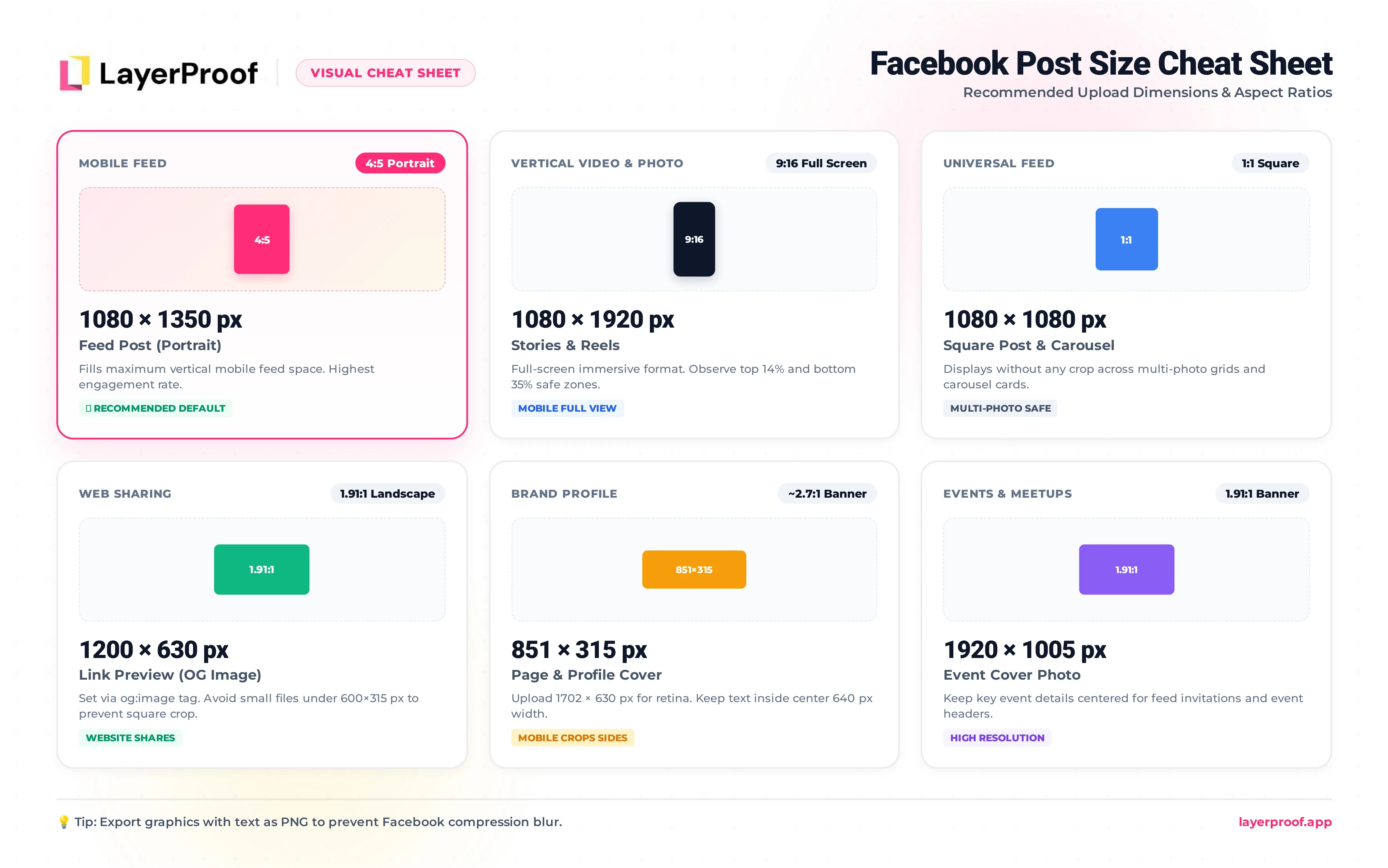
Facebook has more image formats than any other social platform, and nearly every one has its own size. For a feed post, the answer is 1080 x 1350 px (4:5). Stories and Reels take 1080 x 1920 px, Page covers 851 x 315 px, and link previews 1200 x 630 px.
Most Pages get the feed post right and lose quality somewhere else: a cover with the logo cut off on phones, or a shared link that shows up as a tiny square thumbnail. Both are set once and rarely checked again. Below, each format gets its recommended size, the smallest Facebook will accept, and the crop to plan around.
If you post to a Facebook Page every week, LayerProof lays out each post at these exact sizes, and the first one is ready in about 5 minutes.
Key takeaways
-
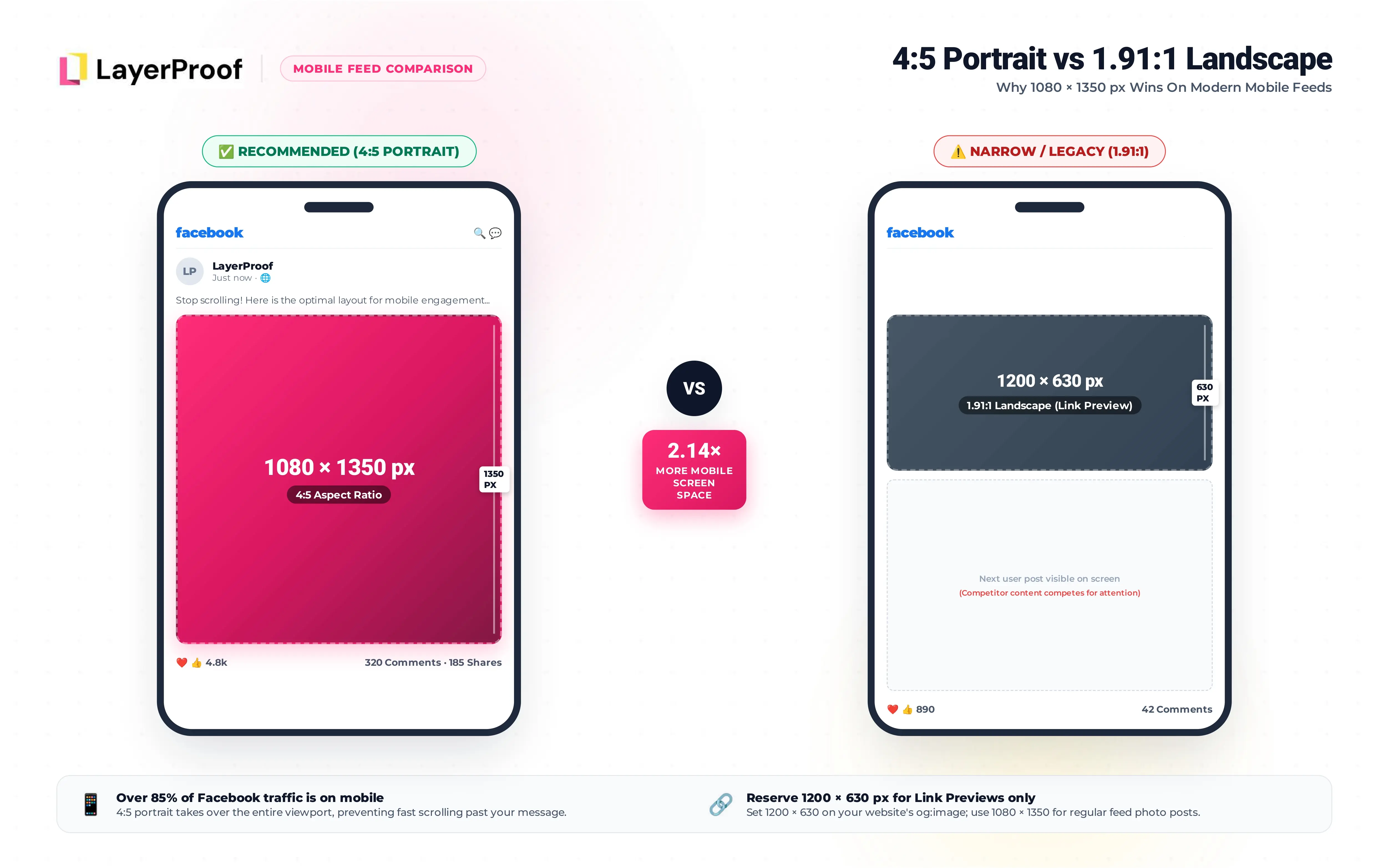
1200 x 630 px is a link size, not a post size. For photos and graphics in the feed, 1080 x 1350 px (4:5) gets more than twice the screen space on a phone.
-
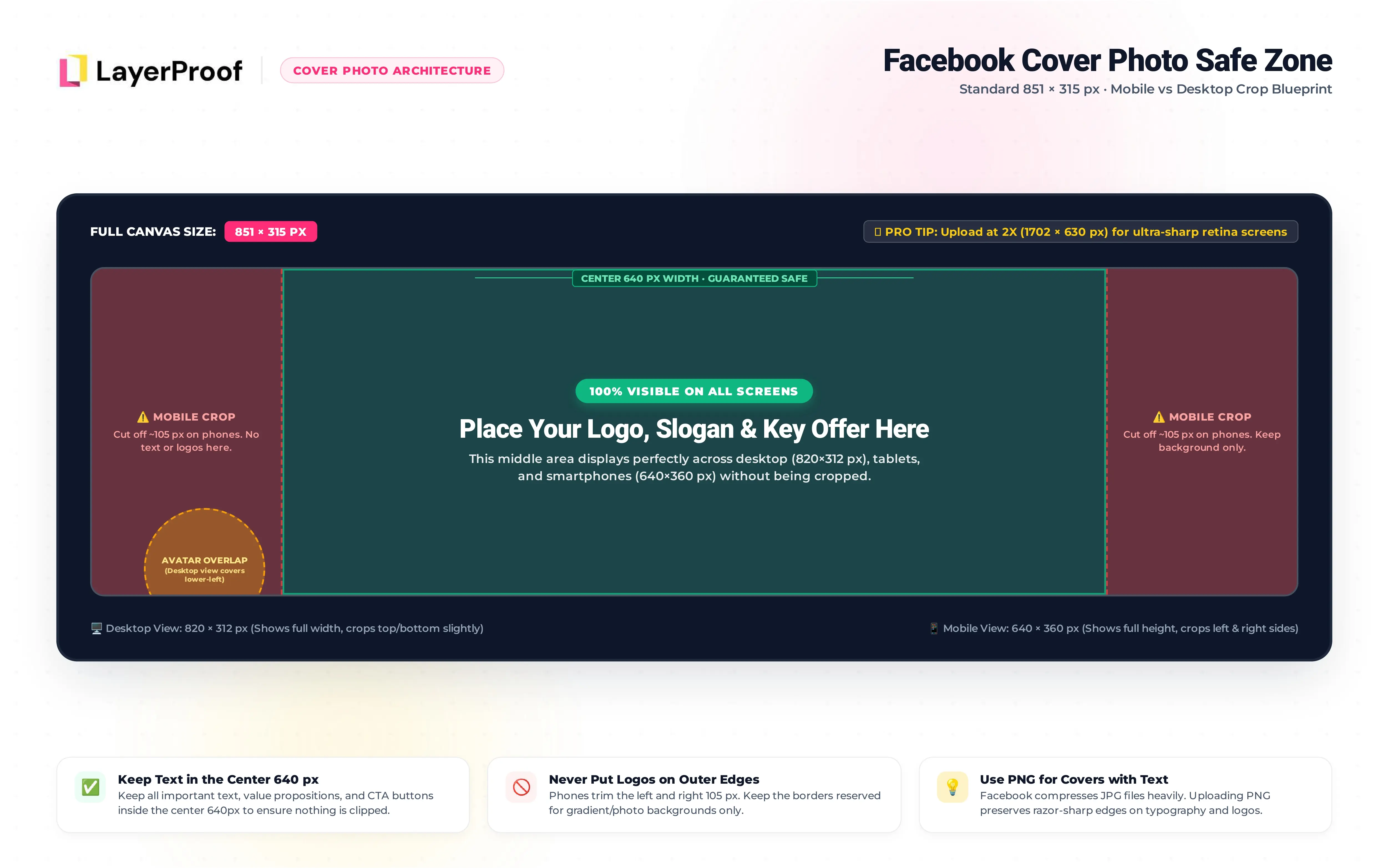
Covers lose their sides on mobile. Keep text and logos inside the center 640 px of an 851 px wide cover.
-
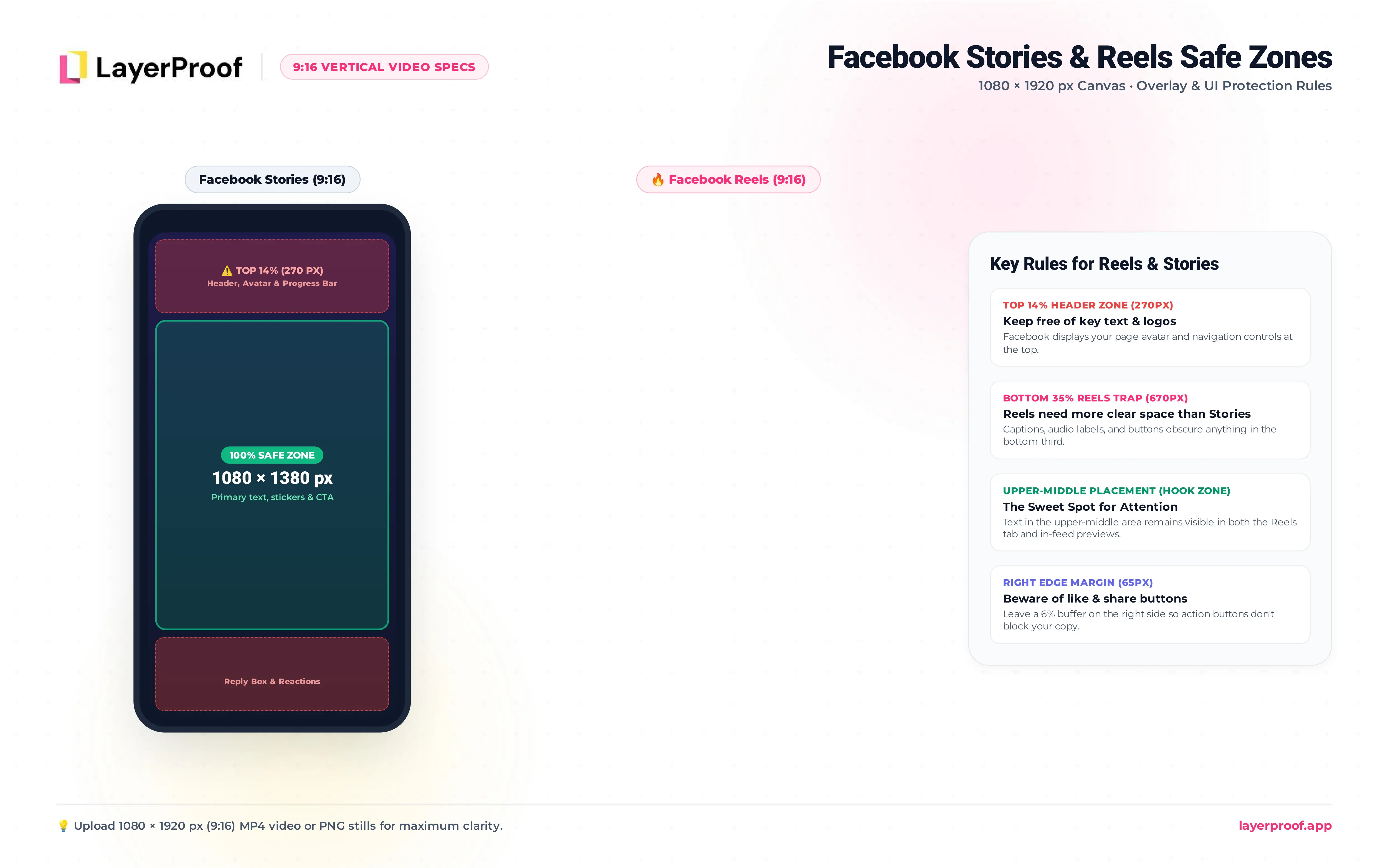
Reels need more clear space than Stories. Stories lose the top and bottom 14%; Reels also lose the bottom 35% to captions and buttons.
-
Ads run larger than posts. Meta recommends 1440 x 1800 px for feed ads and 1440 x 2560 px for Story and Reel ads, and the old 20% text rule no longer applies.
-
A minimum size is not a target. Facebook accepts a 400 x 150 px cover, but it will look soft on any modern screen.
Three sizes cover most Facebook Pages
You do not need a design for every format in this guide. A typical business Page posts in three shapes:
-
1080 x 1350 px for feed posts and most feed ads.
-
1080 x 1920 px for Stories, Reels, and Story or Reel ads.
-
851 x 315 px for the Page cover, refreshed a few times a year.
Add 1200 x 630 px only if you share links to your own website, and set it once on the site itself.
What size is a Facebook post in 2026?
A Facebook feed post works best at 1080 x 1350 px (4:5). The table lists the recommended upload size for every Facebook format, with the smallest size Facebook accepts. All sizes are width x height in pixels.
| Format | Recommended size (px) | Aspect ratio | Minimum (px) |
|---|---|---|---|
| Feed post, portrait | 1080 x 1350 | 4:5 | 600 wide |
| Feed post, square | 1080 x 1080 | 1:1 | 600 x 600 |
| Feed post, landscape | 1200 x 630 | 1.91:1 | 600 x 315 |
| Link preview | 1200 x 630 | 1.91:1 | 600 x 315 |
| Story | 1080 x 1920 | 9:16 | 500 wide |
| Reel | 1080 x 1920 | 9:16 | 540 x 960 |
| Profile picture | 320 x 320 | 1:1 | 180 x 180 |
| Page or profile cover | 851 x 315 | about 2.7:1 | 400 x 150 |
| Event cover | 1920 x 1005 | 1.91:1 | 1200 x 628 |
| Group cover | 1640 x 856 | 1.91:1 | Not published |
| Feed ad, 4:5 | 1440 x 1800 | 4:5 | 600 wide |
| Story or Reel ad | 1440 x 2560 | 9:16 | 600 wide |
What is the best Facebook feed post size?
The best Facebook feed post size is 1080 x 1350 px (4:5). Most people see Facebook on a phone, and a 4:5 image fills more of that screen than a square or landscape one. It also matches the 4:5 feed ad format, so the same design works as an organic post and an ad.
Facebook accepts feed images in any shape from 9:16 (tall) to 16:9 (wide). It shrinks every image to fit a column about 500 px wide, then compresses it. Uploading at 1080 px wide gives Facebook enough detail to stay sharp on high-resolution phones.
When should I use square or landscape Facebook posts?
Use square posts (1080 x 1080 px) for product shots and templates you already have; they display without cropping everywhere. Use landscape (1200 x 630 px) only for wide photos and desktop-first audiences. Landscape posts look smallest in a mobile feed.
Why do some guides say 1200 x 630 is the Facebook post size?
1200 x 630 px is the size for link previews and landscape photos, not the best size for every post. Many guides were written when Facebook’s feed was viewed mostly on desktop. On today’s mobile feed, a 4:5 post at 1080 x 1350 px takes more than twice the vertical space of a 1200 x 630 px image.
How does Facebook display posts with multiple photos?
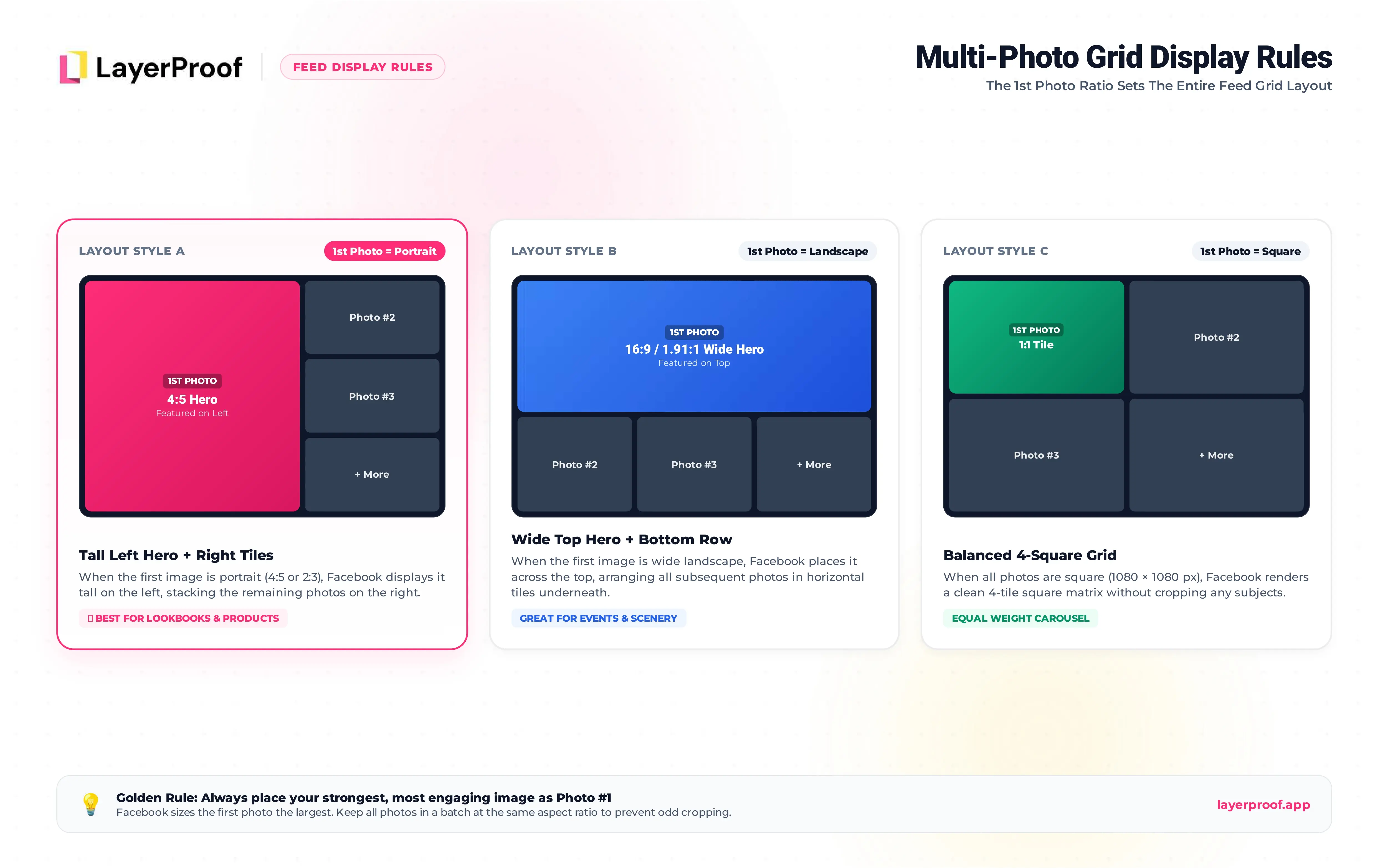
Facebook arranges multi-photo posts in a grid, and the first photo sets the layout. A portrait first photo creates a tall layout with the others stacked beside it. A landscape first photo puts the others underneath. Posts with more than five photos show a “+” count on the last tile.
Upload every photo in a set at the same shape so the grid looks even. Put the strongest image first, since it is shown the largest.
What size is a Facebook link preview image?
A Facebook link preview image is 1200 x 630 px (1.91:1). Facebook pulls it from the og:image tag of the page you share, so you set it on your website, not in the post. Images smaller than 600 x 315 px show as a small square thumbnail instead of a full-width card. Keep the file under 8 MB.
What size are Facebook Stories and Reels?
Facebook Stories and Reels are both 1080 x 1920 px (9:16). They fill the whole phone screen. Stories disappear after 24 hours, while Reels stay on your Page and can show up in the feed and the Reels tab.
What is the Facebook Story safe zone?
Meta recommends keeping the top and bottom 14% of a Story free of text and logos. On a 1080 x 1920 px canvas, that means:
-
Top 270 px: Your Page name, profile picture, and progress bar.
-
Bottom 270 px: The reply field and reaction buttons.
-
Safe area: The middle 1080 x 1380 px, visible on every phone.
What is the Facebook Reels safe zone?
Reels have bigger overlays than Stories. The caption, audio label, and Page name stack up at the bottom, and the like, comment, and share buttons run down the right edge. On a 1080 x 1920 px frame:
-
Top 14% (about 270 px): Keep clear of text.
-
Bottom 35% (about 670 px): Keep clear of text, prices, and logos.
-
Sides 6% (about 65 px each): Keep clear, especially on the right.
Put your hook and key text in the upper-middle part of the frame. That spot stays visible in the Reels tab and when the Reel appears in the feed.
Making video instead of still images? Mylar turns a link, a script, or a rough idea into an AI motion graphic video at the 9:16 size Facebook Reels need.
What size is a Facebook profile picture?
Upload your Facebook profile picture at 320 x 320 px or larger. Facebook displays it at 176 x 176 px on computers and 196 x 196 px on phones, cropped to a circle. The smallest it accepts is 180 x 180 px.
For a business Page, use your logo with padding on all sides so the circle does not clip it. The same picture appears at about 40 x 40 px next to every post and comment, so skip small text.
What size is a Facebook cover photo?
A Facebook cover photo is 851 x 315 px. Facebook shows it at 820 x 312 px on computers and 640 x 360 px on phones. The smallest it accepts is 400 x 150 px, but a cover that small looks blurry on modern screens. For extra sharpness, upload at double size: 1702 x 630 px.
Why is my Facebook cover cut off on mobile?
Phones show the cover in a taller, narrower shape than computers, so they trim the left and right sides. Only about the middle two-thirds of the width shows on every device. Your profile picture also covers part of the lower left on computers.
Keep text, logos, and offers inside the center 640 px of an 851 px wide cover. Leave the edges for background color or texture that can be cropped without losing anything.
Should a Facebook cover be JPG or PNG?
Facebook recommends an sRGB JPG under 100 KB for a cover photo, because it loads fastest. If your cover has text or a logo, use PNG instead; it keeps letters sharp after Facebook compresses the image.
What size is a Facebook event cover?
A Facebook event cover is 1920 x 1005 px (1.91:1). Facebook accepts event covers down to 1200 x 628 px. The event cover appears in feeds, in invitations, and at the top of the event page, often at small sizes.
Put the event name, date, and location in large type in the center. Facebook shows the same details as text below the cover, so the image only needs to catch attention, not hold every detail. You cannot edit an event cover after you post it; you can only replace it.
What size is a Facebook group cover?
A Facebook group cover is 1640 x 856 px (1.91:1). Like Page covers, group covers are trimmed on the sides on phones, so keep text and faces in the center. Many groups use the cover for rules, a welcome message, or the next meetup, which members see each time they open the group.
What size should Facebook ad images be?
Meta’s Ads Guide recommends 1440 x 1800 px (4:5) or 1440 x 1440 px (1:1) for Facebook feed ads, and 1440 x 2560 px (9:16) for Story and Reel ads. Ads use a larger size than organic posts because Meta places the same creative across Facebook, Instagram, and Messenger at different sizes.
| Ad placement | Recommended size (px) | Aspect ratio | Max file size |
|---|---|---|---|
| Feed, portrait | 1440 x 1800 | 4:5 | 30 MB |
| Feed, square | 1440 x 1440 | 1:1 | 30 MB |
| Carousel card | 1080 x 1080 or larger | 1:1 | 30 MB |
| Stories and Reels | 1440 x 2560 | 9:16 | 30 MB |
Three rules keep ad images from being rejected or cropped:
-
Match the ratio closely. Meta allows only a 3% tolerance on aspect ratio, so a 1440 x 1600 px image will be cropped to fit 4:5.
-
Use one ratio across carousel cards. Up to 10 cards, all the same shape.
-
Follow the 9:16 safe zone for Story and Reel ads. The same top 14% and bottom 35% limits from the Reels section apply.
Does the 20% text rule still apply to Facebook ads?
No. Meta stopped enforcing the 20% text rule in 2020 and retired its text overlay checker. Some older guides still mention it. Meta still advises keeping text on ad images short, because images with less text tend to perform better.
Which file type should I upload to Facebook?
The right file type depends on what is in the image. Facebook recompresses every upload, and some formats survive that better than others.
| What the image contains | Upload as | Why |
|---|---|---|
| A photo with no text | JPG | Smallest file, and compression is barely visible on photos |
| Text, a logo, or flat colors | PNG | Letters and edges stay sharp after compression |
| A cover photo with no text | sRGB JPG under 100 KB | Facebook’s own recommendation for fast loading |
| A cover photo with text | PNG | Keeps the text crisp on large desktop screens |
| An ad image | JPG or PNG under 30 MB | Meta’s limit for image ads |
Whichever you choose, export in the sRGB color profile. Other profiles shift when Facebook converts them, and brand colors come out duller.
How do I turn one idea into every Facebook format?
Take a weekend sale at a bakery as an example. The owner wants one message, “20% off all pastries this Saturday,” in front of followers everywhere they look on Facebook. That one idea needs four layouts, not four crops:
| Where it runs | Size (px) | What changes in the layout |
|---|---|---|
| Feed post and feed ad | 1080 x 1350 | Photo on top, offer in large type below |
| Story and Reel cover | 1080 x 1920 | Offer moves up, clear of the bottom 35% |
| Page cover for the week | 851 x 315 | Offer centered, photo spread to the edges |
| Link card for the order page | 1200 x 630 | Short headline, no small print |
Cropping the feed post into the other three is what produces cut-off prices and logos hidden behind buttons. Each shape needs its own arrangement.
That is the job Matte does. You describe the post once, and Matte builds it in a canvas set to Facebook’s exact dimensions, with Instagram and TikTok versions from the same idea. Your Brand Kit keeps the logo, colors, and fonts the same across all of them. The first post takes about 5 minutes, and each one costs about $0.3.
When the weak spot is the product photo itself, say a phone snapshot on a cluttered counter, Vellum can turn it into a clean shot with a new background and a crop that fits the format. Get started today with Matte and have next week’s posts sized before Monday.
Frequently asked questions about Facebook post size
What is the Facebook post size in 2026?
The recommended Facebook post size in 2026 is 1080 x 1350 px (4:5). Facebook also supports 1080 x 1080 px (1:1) and 1200 x 630 px (1.91:1). Stories and Reels use 1080 x 1920 px (9:16).
Is 1080 x 1080 good for Facebook?
Yes. 1080 x 1080 px displays without cropping in the feed, in multi-photo posts, and in carousel ads. It takes less space than 4:5 on a phone, so use 1080 x 1350 px when you want the post to stand out.
Is 1920 x 1080 good for Facebook posts?
1920 x 1080 px (16:9) works but looks small in a mobile feed. Use it for landscape video or wide photos. For Stories and Reels, flip it to 1080 x 1920 px.
Why are my Facebook images blurry?
Facebook compresses every image. Blur usually comes from uploading too small, uploading text-heavy graphics as JPG, or repositioning a cover after upload. Export at 1080 px wide, use PNG for graphics with text, and upload covers at final position.
Are Facebook and Instagram post sizes the same?
Mostly. Both use 1080 x 1350 px (4:5) for feed posts and 1080 x 1920 px (9:16) for Stories and Reels. Instagram also supports 3:4 posts at 1080 x 1440 px, which Facebook may crop. Facebook has extra formats Instagram lacks, such as covers and link previews.
What size is a Facebook carousel?
Facebook carousel ads use 1080 x 1080 px (1:1) cards, up to 10 per ad. On a Page, posting several photos creates a multi-photo grid rather than a swipeable carousel.
References
-
https://www.facebook.com/business/ads-guide/update/image/facebook-feed · Facebook Feed image ad specs · Meta Ads Guide, accessed October 4, 2026 · Meta
-
https://www.facebook.com/business/help/103816146375741 · Best practices for aspect ratios across placements · Meta Business Help Center, accessed October 4, 2026 · Meta
-
https://www.facebook.com/business/help/469767027114079 · Image ad specifications · Meta Business Help Center, accessed October 4, 2026 · Meta
-
https://www.facebook.com/help/125379114252045 · How to make a cover photo for your Facebook Page · Facebook Help Center, accessed October 4, 2026 · Meta