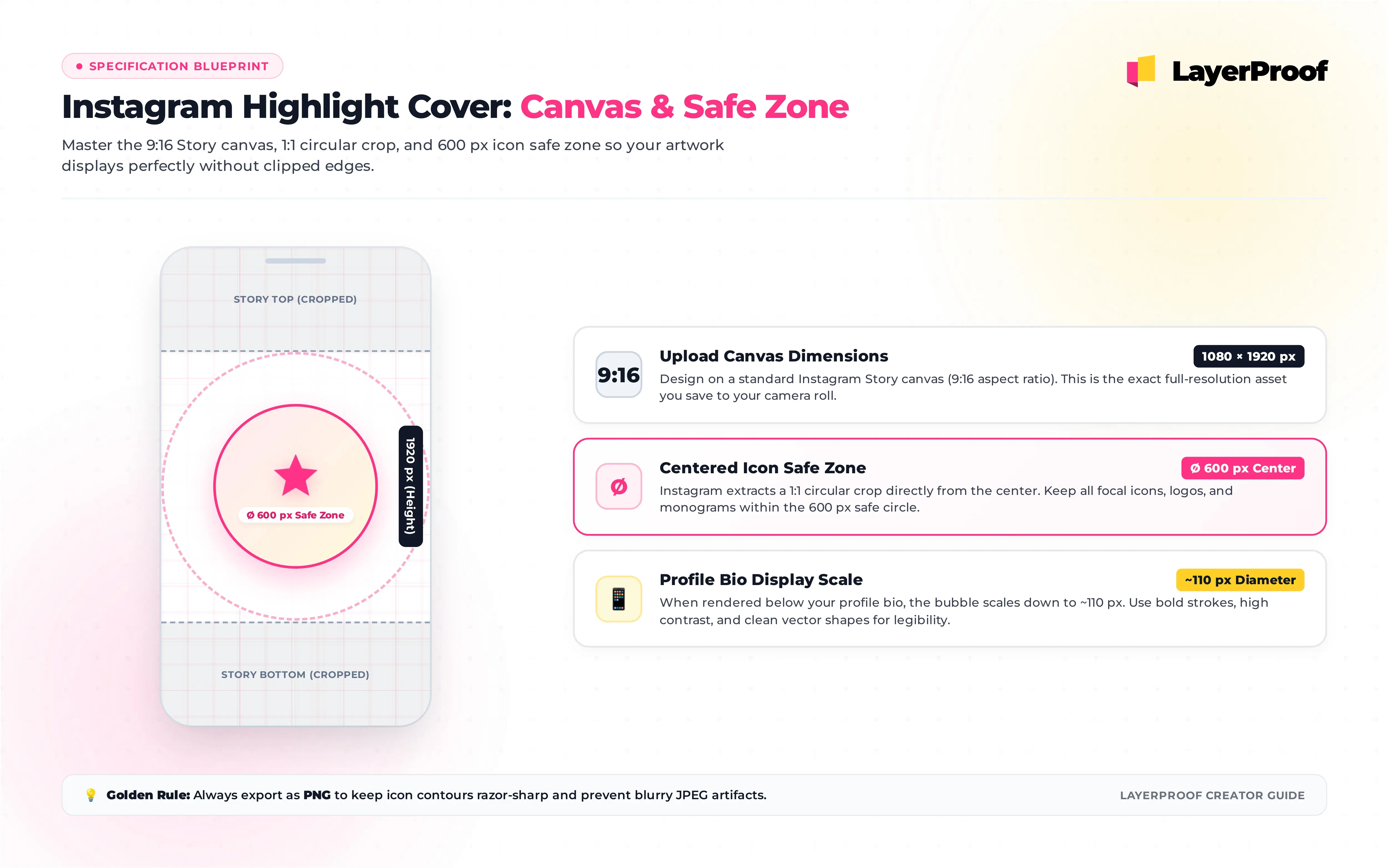
An Instagram highlight cover is the only image on your profile that you design at full Story size and people see at about the size of a fingernail. Make it at 1080 x 1920 px (9:16), the same canvas as a Story, and put the icon or word inside a circle roughly 600 px wide in the exact center. Everything outside that circle is cropped away on your profile.
That gap between the file you make and the dot people see is why so many covers end up blurry, off center, or unreadable. The sections below cover the numbers, where the icon has to sit, and how to set covers without posting them to your Story.
Key takeaways
-
Design on a 1080 x 1920 px canvas. A 1080 x 1080 px square also works, since only the middle is used.
-
Only a center circle shows. Keep the icon inside a circle about 600 px across, in the middle of the canvas.
-
Do not upload at 110 x 110 px. That is roughly how small the cover appears, not the size to upload; tiny files look blurry on modern phones.
-
You do not have to post the cover to your Story. Edit Highlight, then Edit Cover, lets you pick an image straight from your camera roll.
-
Design the set together. Covers sit side by side, so one background color and one icon style make the row read as a menu.
What size is an Instagram highlight cover?
Four numbers matter, and only the first is the file you export:
| What it is | Size | Notes |
|---|---|---|
| File you upload | 1080 x 1920 px (9:16) | Same as a Story; a 1080 x 1080 px square also works |
| Area Instagram crops to | A circle from the center of the image | You can pinch and drag to adjust it before saving |
| Safe area for the icon | A circle about 600 px wide, centered | Leaves margin so the icon never touches the edge of the crop |
| Size on your profile | A small circle under your bio, roughly 110 px on screen | Varies by phone; this is display size, not upload size |
Instagram does not publish an official highlight cover spec. It treats the cover as a Story image or a photo from your camera roll and crops a circle from it. That is why guides disagree on the “right” size: they are describing different parts of the same process.
Should the cover file be 1080 x 1920 or 1080 x 1080?
Either works. A 1080 x 1920 px file matches the Story canvas, so it is the natural choice if you also post the cover as a Story or use a Story template. A 1080 x 1080 px square makes the crop easier to predict, because the circle fills almost the whole image. Both should be at least 1080 px wide so the cover stays sharp on high-resolution screens.
Where should the icon go on a highlight cover?
In the exact center, inside a circle about 600 px wide. Here are the coordinates for both canvas sizes, measured from the top-left corner:
| Canvas | Center point | Icon safe circle spans |
|---|---|---|
| 1080 x 1920 px | 540, 960 | 240 to 840 across, 660 to 1260 down |
| 1080 x 1080 px | 540, 540 | 240 to 840 across, 240 to 840 down |
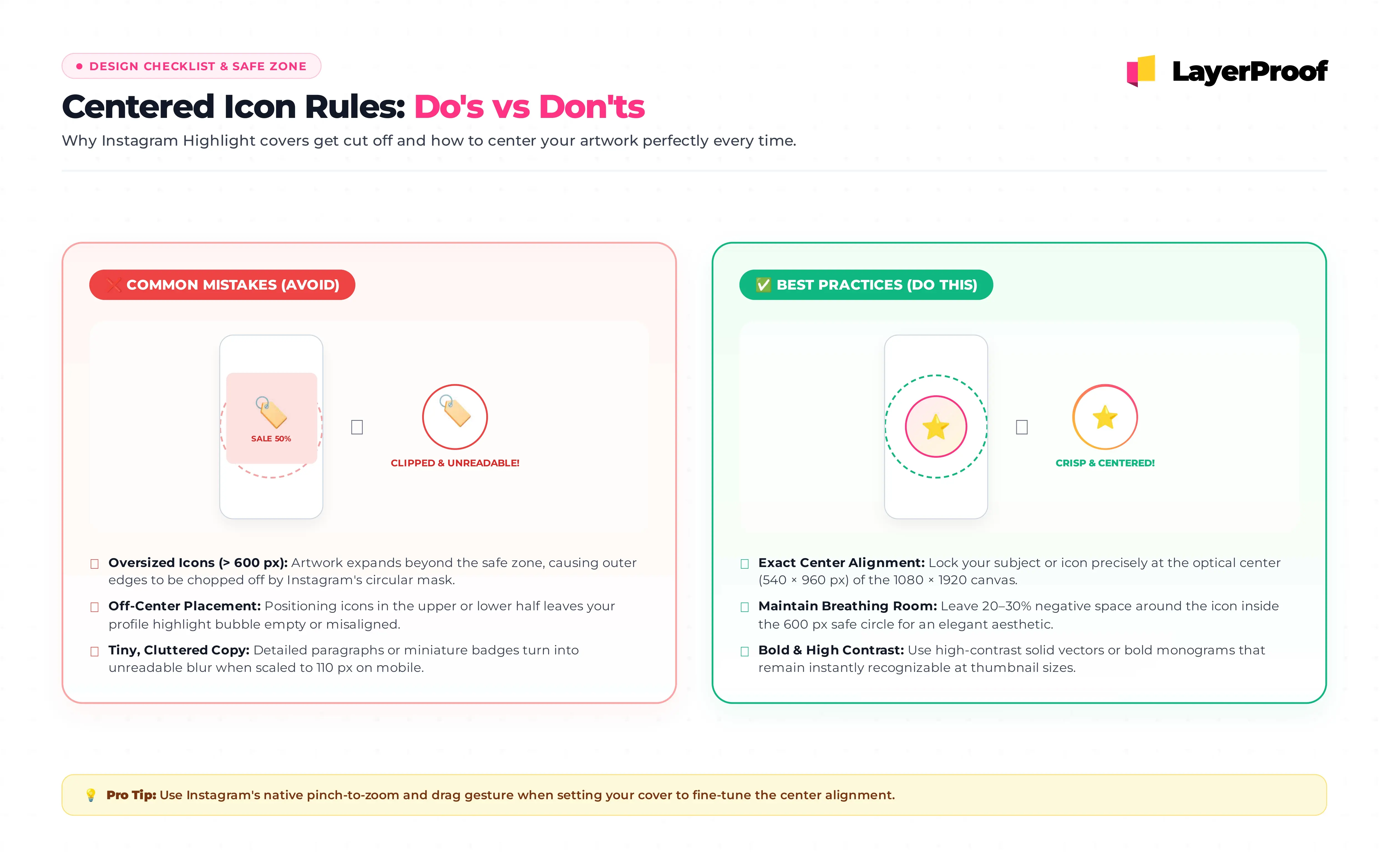
The icon itself should be smaller than the safe circle, around 350 to 450 px wide, so it has breathing room inside the crop. A background color can fill the whole canvas; only the icon needs to stay inside the circle.
Why not use the whole circle?
Because the crop is not fixed. When you set a cover, Instagram shows a circle you can drag and zoom, and its starting position can vary slightly between app versions. A 600 px safe circle leaves enough margin that a small shift or zoom never clips the icon. If you prefer to use the full circle, check the preview carefully before tapping Done.
How do I add a highlight cover without posting it to my Story?
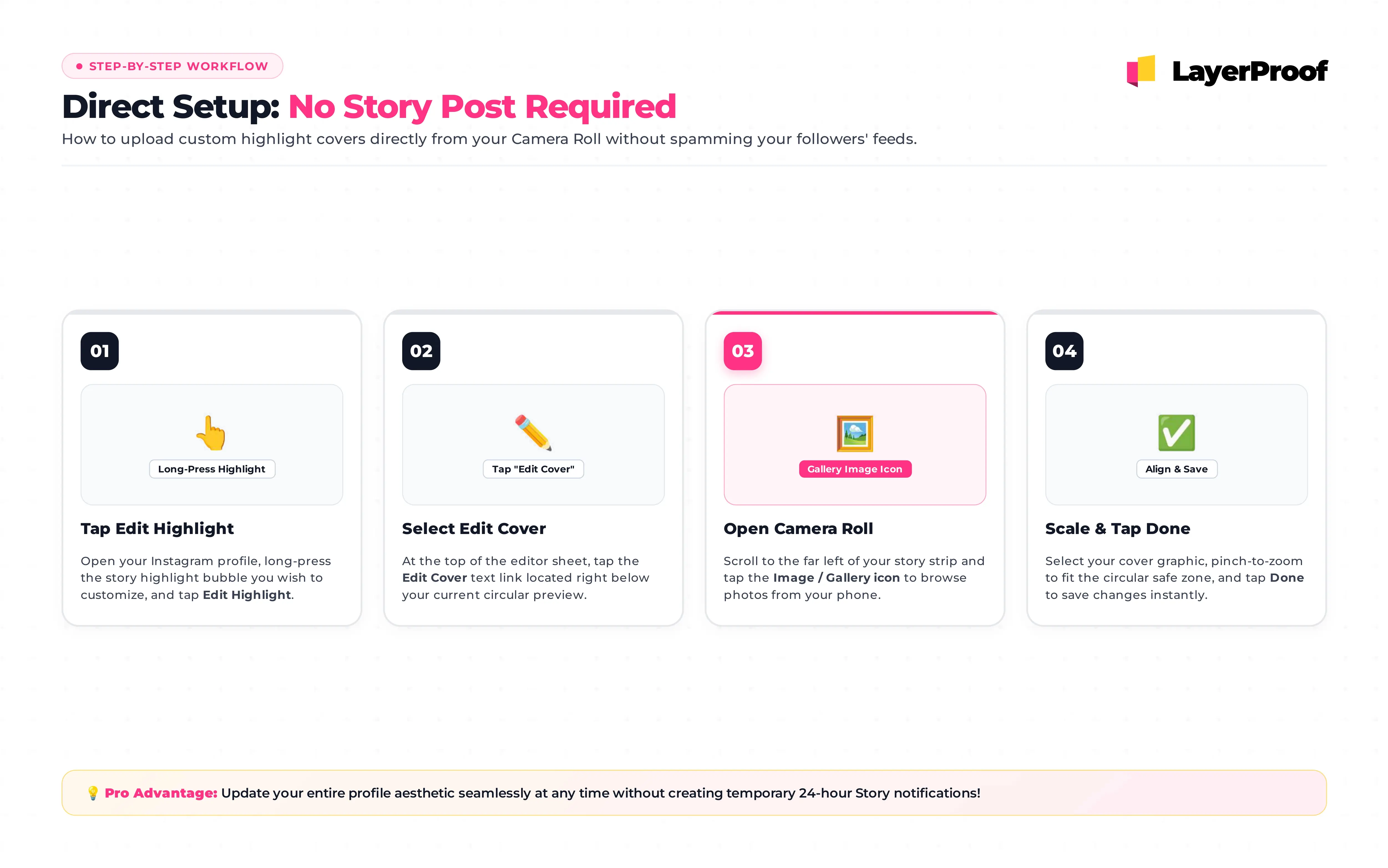
You no longer need to post a cover to your Story first. Older tutorials still recommend that workaround, but Instagram now lets you pick a cover straight from your camera roll.
To change the cover of an existing highlight
-
On your profile, press and hold the highlight.
-
Tap Edit highlight, then Edit cover.
-
Tap the photo icon at the bottom of the screen and choose your cover from your camera roll.
-
Drag and pinch so the icon sits in the middle of the circle, then tap Done.
To create a new highlight with a custom cover
-
On your profile, tap New under your bio.
-
Select at least one Story from your archive, then tap Next.
-
Tap Edit cover, then the photo icon, and pick your cover image.
-
Name the highlight and tap Add.
A highlight needs at least one Story inside it, so you cannot create an empty one just to hold a cover. Your Story archive also has to be turned on, since highlights are built from it.
How do I control the order of my highlights?
Instagram does not offer a reorder button. Creators commonly report that editing a highlight moves it to the front of the row, so the workaround is to edit them in reverse: start with the highlight you want last and finish with the one you want first.
How do I design a highlight cover people can actually read?
Design for the smallest size first. A cover that works at thumbnail size will look fine everywhere; a cover that only works at full size will turn into a blur under your bio.
| Works at small size | Breaks at small size |
|---|---|
| One bold icon per cover | Several small icons or a scene |
| Thick strokes, about 24 px or more on a 1080 px canvas | Thin line icons that fade into the background |
| Strong contrast between icon and background | Pastel icon on a pastel background |
| A solid or softly textured background | A detailed photo behind the icon |
| No text, since the highlight name already sits below | A word on the cover that repeats the name in smaller type |
To test a cover before uploading, zoom your design app out until the icon circle is about 1.5 cm wide on screen. If you can still tell what the icon is, it will work on your profile.
How should a set of covers work together?
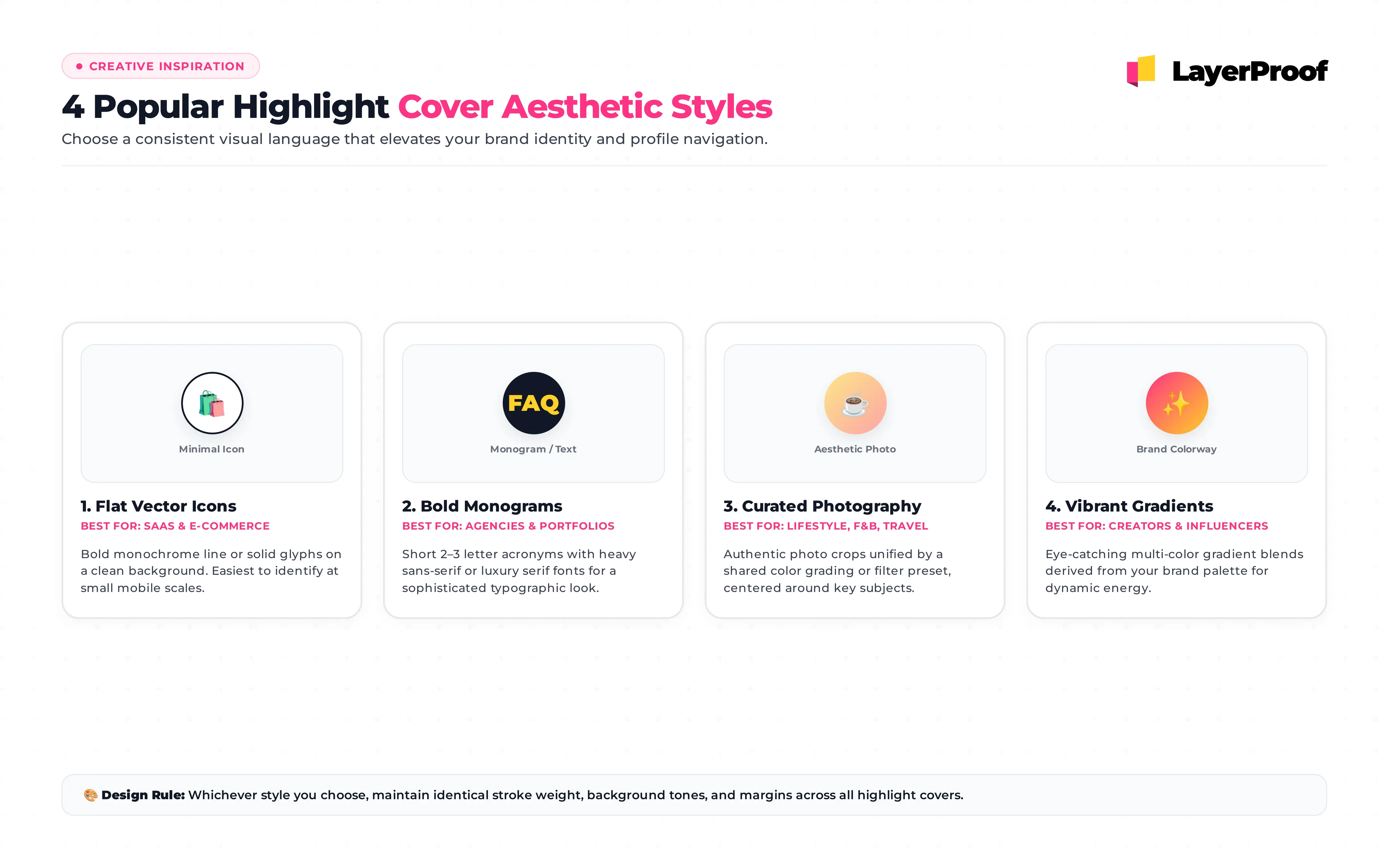
Highlights sit side by side, so the row reads like a menu. Pick one rule and apply it to every cover: the same background color with different icons, or the same icon style on alternating brand colors. Keep the highlight names short, around 10 characters, because longer names are cut off under the circle.
Why does my highlight cover look wrong?
Most cover problems trace back to one of five causes:
| Problem | Likely cause | Fix |
|---|---|---|
| Cover looks blurry | File smaller than 1080 px wide, or a JPG with fine lines | Export at 1080 px wide as PNG |
| Icon sits off center | Icon not centered on the canvas, or the crop circle was dragged | Re-center on the canvas, then check the circle preview before saving |
| Edges of the icon are cut off | Icon larger than the safe circle | Shrink it to fit inside the center 600 px |
| Camera roll option is missing | Older app version or a gradual rollout | Update the app; if it is still missing, post the cover to a Close Friends Story and pick it from there |
| New cover does not appear | The app is showing a cached version | Close and reopen Instagram, or edit the cover again |
Covers are set in the Instagram mobile app, so keep the finished files on your phone, in an album you can find quickly when you add new highlights.
What should go inside each highlight?
A good cover earns the tap; the Stories inside decide whether it was worth it. For a business account, highlights work best as a short, permanent menu that answers the questions new visitors ask before they follow or buy:
| Highlight | What to put inside |
|---|---|
| Start here | Who you are, what you sell, and who it is for, in three or four Stories |
| Products or Services | One Story per product or service, with the price or a clear next step |
| Reviews | Screenshots of real customer messages or reviews |
| FAQ | Answers to the questions you get most in DMs |
| How to order | Where to buy, delivery areas, and opening hours |
Keep each highlight to a handful of Stories and refresh them when prices, products, or hours change. Visitors tap through quickly, and an outdated price in a highlight costs more trust than having no highlight at all.
Building those Stories is where most of the effort goes. Matte lays out Instagram Stories and posts on canvases set to Instagram’s exact dimensions, with your brand colors and fonts applied, so a highlight’s worth of Stories can match the cover that leads into it. Matte is part of LayerProof; get started today and rebuild your Start here highlight first.
Frequently asked questions about Instagram highlight covers
What is the Instagram highlight cover size?
Design the cover at 1080 x 1920 px (9:16) or 1080 x 1080 px (1:1). Instagram crops a circle from the center, so keep the icon inside a centered circle about 600 px wide.
Will my followers see it if I change a highlight cover?
No. Choosing a cover from your camera roll through Edit highlight and Edit cover does not post anything to your Story or notify anyone. The new cover simply appears on your profile.
Does the cover have to be one of the Stories in the highlight?
No. You can use any image from your camera roll. The cover is stored separately and does not appear when someone taps through the highlight.
Can a highlight cover be animated?
No. Covers are still images. If you pick a video Story from the highlight as the cover, Instagram uses a single frame from it.
Should highlight covers be PNG or JPG?
PNG for icons, flat colors, and text, because it keeps edges sharp. JPG is fine for photo-based covers. Either way, export at least 1080 px wide.
Why is 110 x 110 px listed as the highlight cover size in some guides?
That number describes roughly how large the cover appears on a profile, not the size to upload. A file that small gets scaled up on high-resolution phones and looks soft, so upload at 1080 px wide instead.
References
-
https://www.facebook.com/help/instagram/813938898787367 · Add a story highlight to your Instagram profile · Instagram Help Center, accessed October 4, 2026 · Meta
-
https://help.instagram.com/1631821640426723 · Image resolution of photos you share on Instagram · Instagram Help Center, accessed October 4, 2026 · Meta