On LinkedIn, the people looking at your images are often deciding whether to hire you, buy from you, or take your call. A blurry headshot or a banner with half the tagline cut off says something before your headline does.
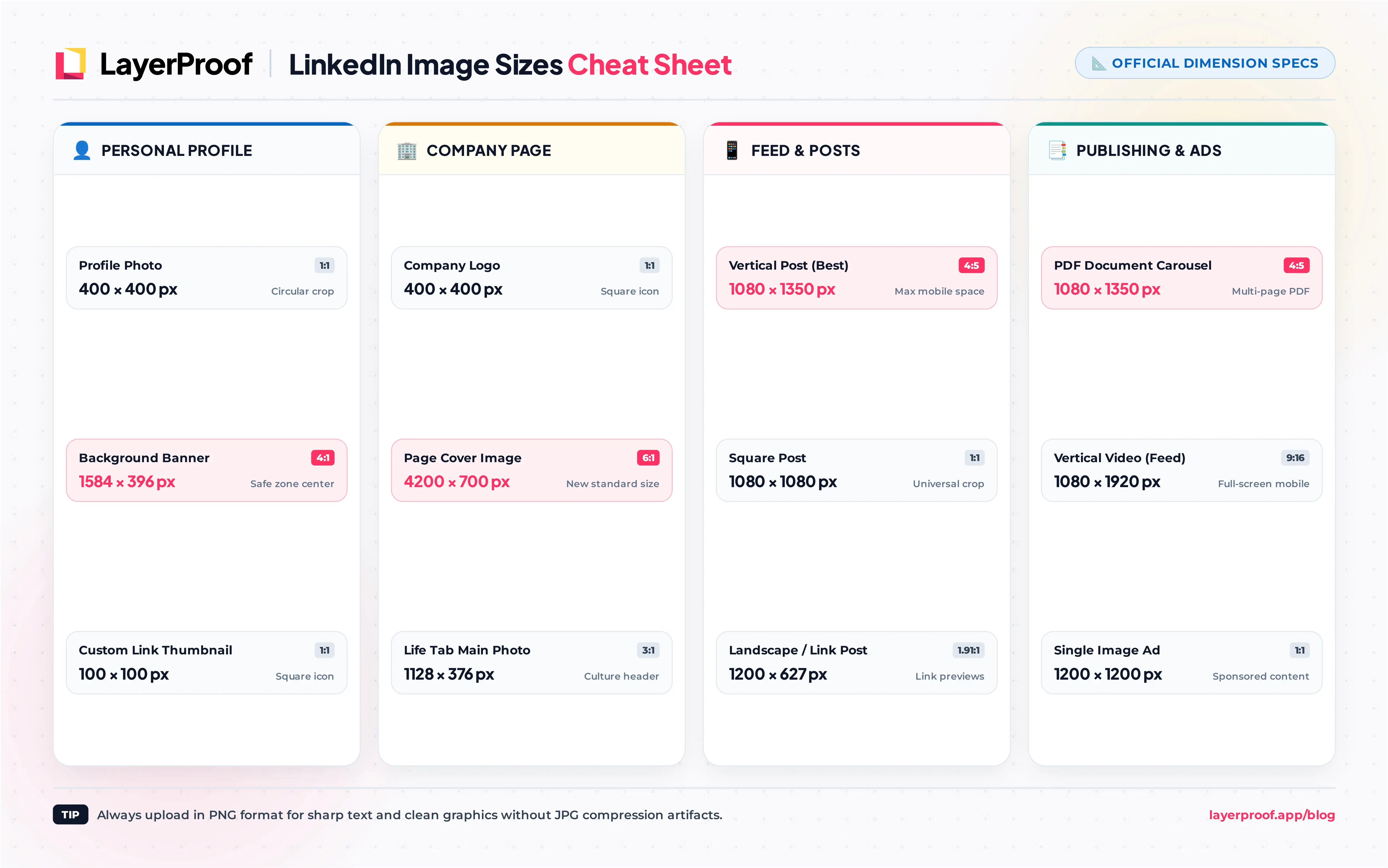
The core LinkedIn image sizes for 2026 are 400 x 400 px for a profile photo, 1584 x 396 px for a profile banner, 4200 x 700 px for a Company Page cover, and 1080 x 1350 px (4:5) for a feed post. The catch is that LinkedIn runs two kinds of presence, a personal profile and a Company Page, and each has its own sizes. This guide is organized by where the image appears, so you can jump to the part you are working on.
Key takeaways
-
Company Page covers are 4200 x 700 px now. Many guides still say 1128 x 191 px, an older size that looks soft on today’s screens.
-
Profile banners lose their edges on phones. Keep the message in the center of the 1584 x 396 px frame and away from the lower left, where your photo sits.
-
Vertical beats landscape in the feed. A 1080 x 1350 px (4:5) image takes far more space on a phone than the 1200 x 627 px link-style image older guides recommend.
-
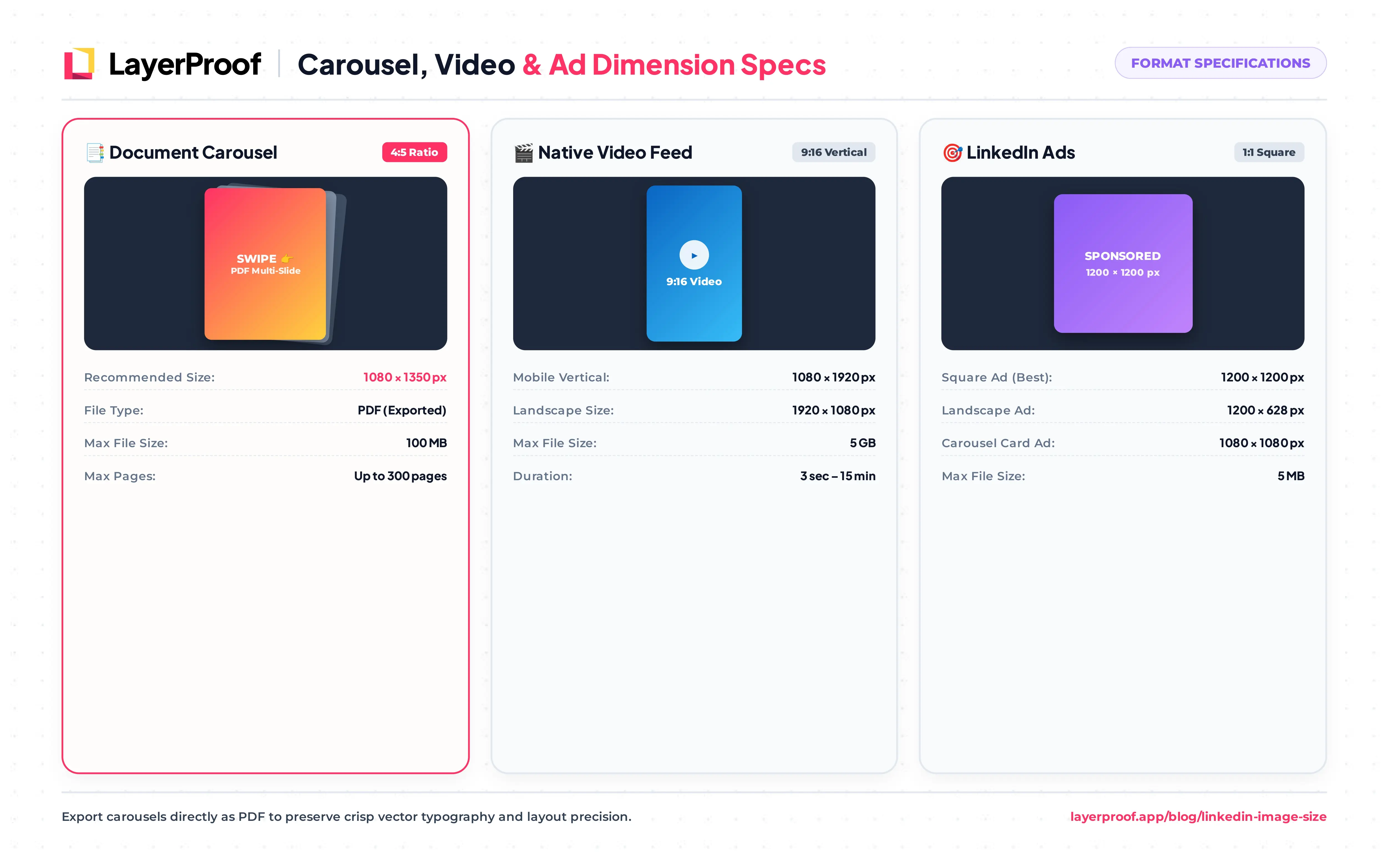
Document posts are the LinkedIn carousel. Upload a PDF with every page at the same size, ideally 1080 x 1350 px.
-
Video can run up to 15 minutes and 5 GB. LinkedIn accepts almost any shape from 1:2.4 to 2.4:1, and vertical clips fill the most screen on mobile.
What are all the LinkedIn image sizes?
The table groups every LinkedIn image by where it appears. All sizes are width x height in pixels.
| Where it appears | Image | Recommended size (px) | Aspect ratio |
|---|---|---|---|
| Personal profile | Profile photo | 400 x 400 | 1:1 |
| Personal profile | Background banner | 1584 x 396 | 4:1 |
| Company Page | Logo | 400 x 400 | 1:1 |
| Company Page | Cover image | 4200 x 700 | 6:1 |
| Company Page | Life tab main image | 1128 x 376 | 3:1 |
| Company Page | Life tab custom module | 502 x 282 | 16:9 |
| Company Page | Life tab company photo | 900 x 600 | 3:2 |
| Feed | Single image, portrait | 1080 x 1350 | 4:5 |
| Feed | Single image, square | 1080 x 1080 | 1:1 |
| Feed | Single image, landscape | 1200 x 627 | 1.91:1 |
| Feed | Document post page | 1080 x 1350 | 4:5 |
| Feed | Link preview | 1200 x 627 | 1.91:1 |
| Publishing | Article or newsletter cover | 1920 x 1080 | 16:9 |
| Publishing | Event cover | 1776 x 444 | 4:1 |
| Ads | Single image, landscape | 1200 x 628 | 1.91:1 |
| Ads | Single image, square | 1200 x 1200 | 1:1 |
| Ads | Single image, vertical (mobile only) | 720 x 900 | 4:5 |
| Ads | Carousel card | 1080 x 1080 | 1:1 |
What size should my LinkedIn profile photo and banner be?
Upload your profile photo at 400 x 400 px or larger and your background banner at 1584 x 396 px. Both can be up to 8 MB, and the photo can be as large as 7680 x 4320 px.
How does LinkedIn crop my profile photo?
LinkedIn shows your photo as a circle, and most of the time at a very small size: next to your comments, in search results, and in message lists it is not much larger than a thumbnail. Two rules follow from that:
-
Fill the frame with your face. Head and shoulders, with your face taking up roughly 60% of the image, stays recognizable when it shrinks.
-
Use a plain background. Busy offices and landscapes turn to noise at thumbnail size.
LinkedIn’s profile photo rules also ask for a real likeness of you, so logos and illustrations belong on a Company Page, not a personal profile.
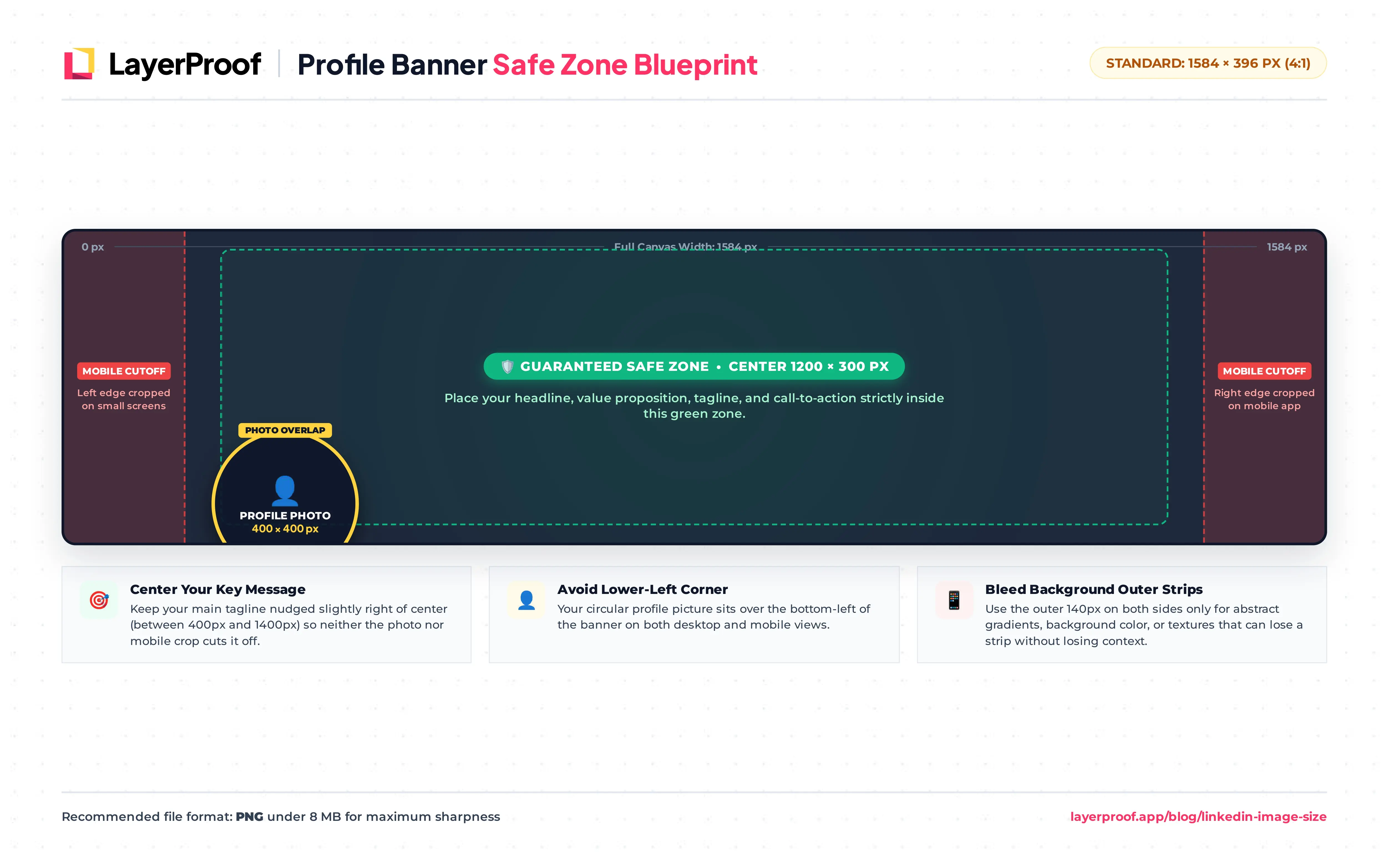
Why is my LinkedIn banner cut off on mobile?
The 1584 x 396 px banner shows in full on a computer, but phones crop the left and right edges and show a taller slice of the center. Your profile photo also sits over the lower left of the banner on both.
Keep your tagline, logo, or call to action inside roughly the middle 1200 x 300 px, nudged toward the right so the photo does not cover it. Use the outer edges for color, texture, or a photo that can lose a strip without losing meaning.
What size is a LinkedIn Company Page cover and logo?
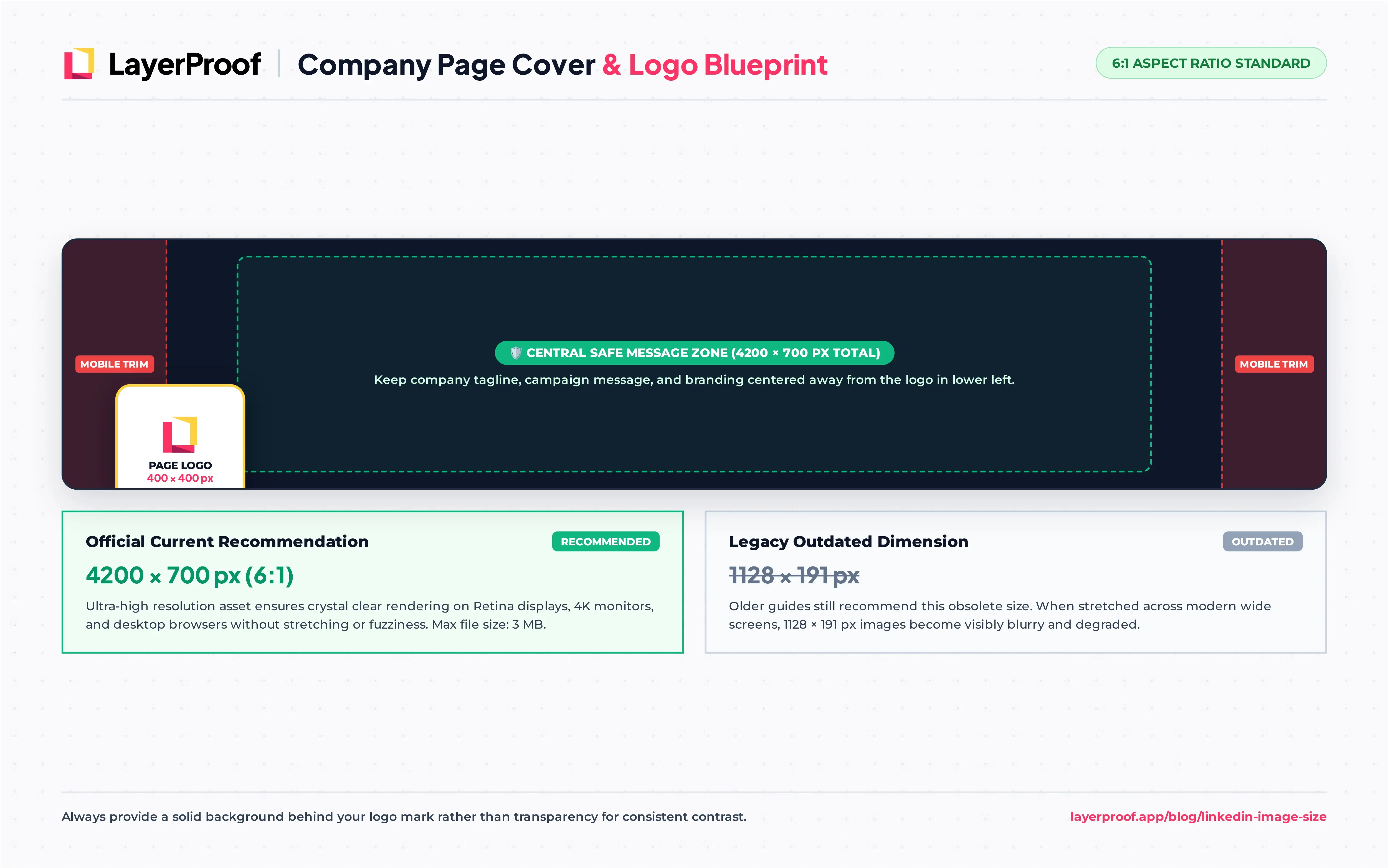
A LinkedIn Company Page uses a 400 x 400 px logo and a 4200 x 700 px cover image. LinkedIn lists 4200 x 700 px as both the minimum and the recommended cover size, in PNG or JPEG under 3 MB.
| Page image | Size (px) | Max file size |
|---|---|---|
| Logo | 400 x 400 | 3 MB |
| Cover image | 4200 x 700 | 3 MB |
| Life tab main image | 1128 x 376 | 3 MB |
| Life tab custom module | 502 x 282 | 3 MB |
| Life tab company photo | 900 x 600 | 3 MB |
Why do some guides say the Page cover is 1128 x 191 px?
That was LinkedIn’s Page cover size before the current Page layout. LinkedIn’s help center now lists 4200 x 700 px, and an image built at 1128 x 191 px has to be stretched to fill today’s wider cover area, which makes it look blurry on large screens. If your cover was made a few years ago, it is worth rebuilding at the new size.
How should I design a Company Page cover?
The Page logo overlaps the lower left of the cover, and phones trim the sides, so treat the center as the only guaranteed space. A short brand line or a current campaign message works better than a crowded collage. The logo itself is shown on both light and dark backgrounds, so give it a solid, padded background rather than transparency.
What is the best LinkedIn post image size?
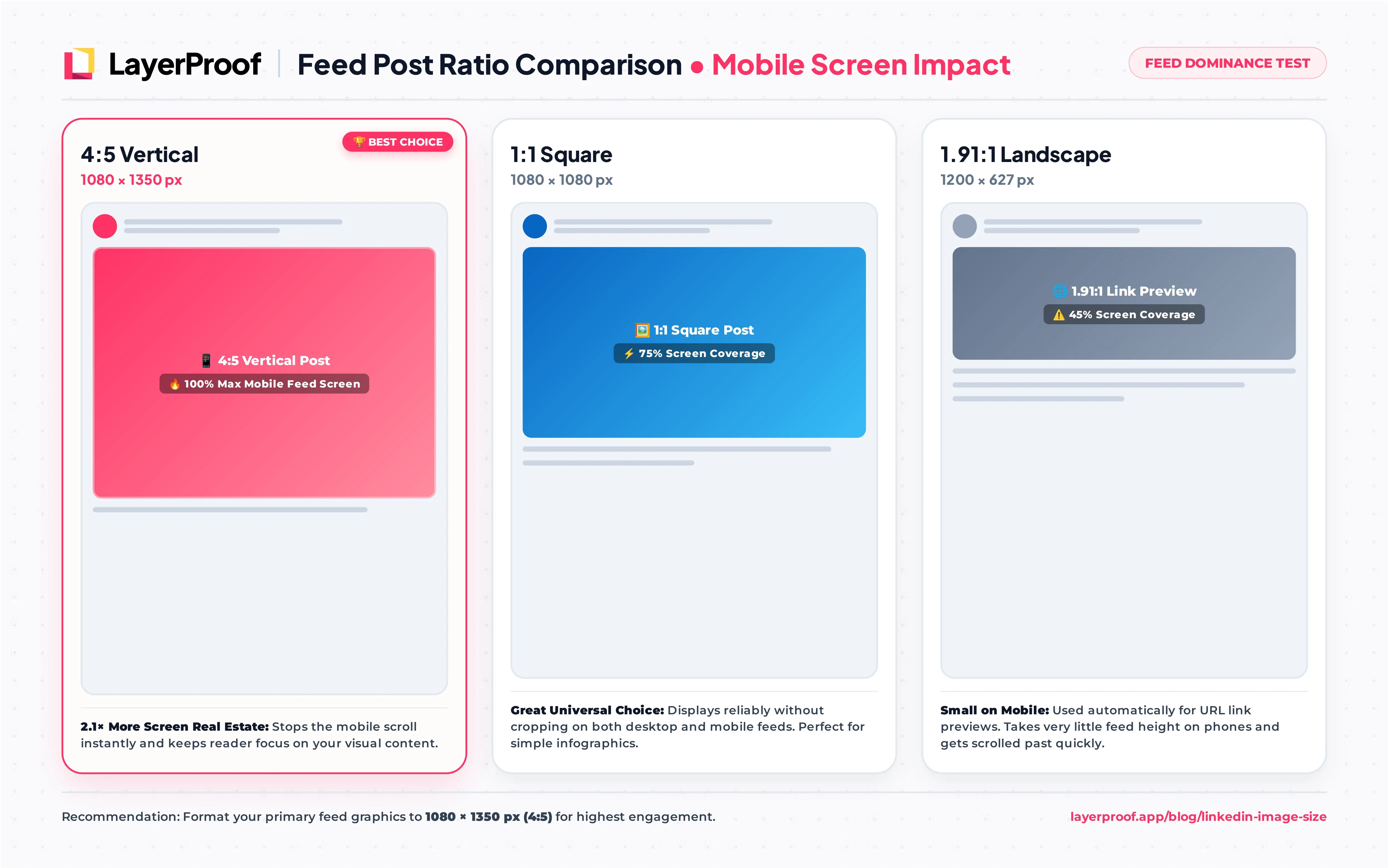
The best LinkedIn post image size is 1080 x 1350 px (4:5). On a phone, a 4:5 image is more than twice as tall as a 1200 x 627 px landscape image at the same width, so it holds the scroll longer. Square (1080 x 1080 px) is a solid second choice and displays without cropping on both desktop and mobile.
The 1200 x 627 px size that many guides lead with is really the link preview size. It still works for wide charts and screenshots, but it shows up small in a mobile feed.
What size should LinkedIn document carousels be?
LinkedIn’s swipeable carousel is a document post: you upload a PDF, PowerPoint, or Word file, and each page becomes a slide. Files can be up to 100 MB and 300 pages. For a mobile-friendly carousel:
-
Make every page the same size. 1080 x 1350 px (4:5) fills the most screen; 1080 x 1080 px also works.
-
Export as PDF. It keeps fonts and layout exactly as designed, which PowerPoint and Word files do not always do.
-
Give the document a title. LinkedIn shows it above the first page, so it doubles as a headline.
How do multi-image posts display?
LinkedIn arranges several images in a grid, with the first image shown largest and a “+” count on the last tile when there are more than fit. Use the same shape for every image so the grid looks intentional, and lead with the strongest one.
Why is my LinkedIn link preview showing the wrong image?
LinkedIn pulls the preview from the page’s og:image tag, which should point to a 1200 x 627 px image. LinkedIn also caches previews, so a page you fixed may keep showing the old image. Paste the URL into LinkedIn’s Post Inspector to refresh the cache before you share it again.
What size are LinkedIn article, newsletter, and event covers?
Use 1920 x 1080 px (16:9) for article and newsletter covers and 1776 x 444 px (4:1) for event covers. These images appear in two places: at full size at the top of the article or event page, and as a much smaller card when someone shares it in the feed.
| Cover | Size (px) | Where it shows small |
|---|---|---|
| Article cover | 1920 x 1080 | Feed card when the article is shared |
| Newsletter edition cover | 1920 x 1080 | Feed card and subscriber notifications |
| Event cover | 1776 x 444 | Event invitations and feed posts |
Because the feed card is small, design these covers to be read at a glance: one short line of large text, a single image, and nothing important near the edges. The full article title already appears under the card, so the cover does not need to repeat all of it.
Does the event cover need the date on it?
No. LinkedIn shows the event name, date, and time as text next to the cover, and that text updates if you reschedule. A date baked into the image does not, so leave it out and use the space for the topic or the speaker.
What are LinkedIn’s video size limits?
LinkedIn accepts videos from 3 seconds to 15 minutes, up to 5 GB, at any resolution between 256 x 144 px and 4096 x 2304 px. Those limits come from LinkedIn’s help center, and they are more generous than several older guides suggest.
| Spec | LinkedIn limit |
|---|---|
| Length | 3 seconds to 15 minutes (2 seconds minimum from the mobile app) |
| File size | Up to 5 GB |
| Resolution | 256 x 144 px to 4096 x 2304 px |
| Aspect ratio | Anywhere from 1:2.4 (tall) to 2.4:1 (wide) |
| Videos per post | One |
Which video shape works best on LinkedIn?
For most business video, 1080 x 1920 px (9:16) or 1080 x 1350 px (4:5). LinkedIn’s mobile app has a full-screen video feed, and vertical clips fill it; a 16:9 clip shows as a narrow band in the middle. Keep 16:9 for webinar recordings and screen demos that people are likely to watch on a computer.
Two extras make a noticeable difference: upload a custom thumbnail, since the auto-picked frame is often mid-blink, and add captions, because many people watch the feed with the sound off.
What size should LinkedIn ad images be?
LinkedIn single image ads come in three shapes, and carousel ads use square cards. Each shape has a recommended size and a minimum below which the ad is rejected.
| Ad format | Recommended (px) | Minimum (px) | Max file size |
|---|---|---|---|
| Single image, landscape | 1200 x 628 | 640 x 360 | 5 MB |
| Single image, square | 1200 x 1200 | 360 x 360 | 5 MB |
| Single image, vertical (mobile only) | 720 x 900 | 360 x 640 | 5 MB |
| Carousel card (2 to 10 cards) | 1080 x 1080 | Not published | 10 MB per card |
| Video ad | 1080 x 1920, 1080 x 1080, or 1920 x 1080 | Varies by shape | 200 MB, MP4 |
Which LinkedIn ad shape should I use?
If the ad runs on both desktop and mobile, use square. It displays fully everywhere and takes more feed space than landscape. Vertical ads only run on mobile, so pair them with a square or landscape version if you also want desktop reach.
For carousel ads, treat each card as its own small ad: one product, one benefit, or one step, with the headline readable at thumbnail size. Organic document carousels and paid carousel ads are different formats, so a PDF built at 4:5 will need square versions of its pages before it can run as a carousel ad.
How can a small team keep up with LinkedIn visuals?
LinkedIn rewards consistency more than polish: a Page that posts a clear image or short video every week tends to beat one that posts a perfect campaign once a quarter. The bottleneck for most small teams is producing those assets at the right sizes, week after week.
Two kinds of content cover most of a business Page’s feed:
-
Product and service images. A single good product shot, rebuilt as a 1080 x 1350 px post and a 1080 x 1080 px carousel card. Vellum turns one product photo into new backgrounds, angles, and crops, so each format gets an image that fits rather than a stretched one.
-
Short vertical video. LinkedIn’s mobile video feed favors vertical clips. Mylar turns a link, a script, or a rough idea into an AI motion graphic video in the 9:16 format, which you can post as is or pair with a 4:5 cut for the main feed.
Both are part of LayerProof. Get started today with one product photo and one blog post, and you have next week’s LinkedIn image and video ready to schedule.
Frequently asked questions about LinkedIn image sizes
What is the LinkedIn banner size?
A personal profile banner is 1584 x 396 px (4:1). A Company Page cover is 4200 x 700 px (6:1). They are different images with different sizes, so a banner made for one will not fit the other.
Is 1200 x 627 still the right size for LinkedIn posts?
It works, but it is no longer the best choice for image posts. 1200 x 627 px is the link preview size. For an uploaded image, 1080 x 1350 px (4:5) or 1080 x 1080 px (1:1) takes much more space in the mobile feed.
What size is a LinkedIn carousel?
An organic LinkedIn carousel is a document post, and 1080 x 1350 px pages work best. A paid carousel ad uses 1080 x 1080 px cards, with 2 to 10 cards per ad.
Why does my LinkedIn image look blurry?
Usually because it was uploaded smaller than the space it fills, like an old 1128 x 191 px Page cover, or because text-heavy graphics were saved as JPG. Upload at the recommended size or larger, and use PNG for images with text.
Can I use my company logo as my personal profile photo?
LinkedIn’s profile photo guidelines ask for a picture of you, not a logo or illustration. Put the logo on the Company Page and use a clear headshot on your personal profile.
How big can a LinkedIn profile photo file be?
Up to 8 MB and up to 7680 x 4320 px. Anything 400 x 400 px or larger will look sharp, so there is no benefit to uploading a huge file.
References
-
https://www.linkedin.com/help/linkedin/answer/70781 · Image specifications for your LinkedIn Pages and Career Pages · LinkedIn Help, accessed October 4, 2026 · LinkedIn
-
https://www.linkedin.com/help/linkedin/answer/a548372 · Video sharing troubleshooting · LinkedIn Help, accessed October 4, 2026 · LinkedIn
-
https://www.linkedin.com/help/linkedin/answer/a7486279 · Share videos on LinkedIn · LinkedIn Help, accessed October 4, 2026 · LinkedIn