Social media image sizes are the exact pixel dimensions and aspect ratios each platform expects for profile photos, covers, feed posts, and vertical formats. In 2026, the safest defaults are 1080 x 1350 px (4:5) for feed posts, 1080 x 1920 px (9:16) for Stories, Reels, and TikTok, and 1200 x 630 px for link previews. LayerProof builds each post in a real canvas sized to each platform's exact dimensions, so one idea becomes a native layout for Facebook, Instagram, and TikTok, ready in about 5 minutes.
This guide covers Instagram, Facebook, TikTok, LinkedIn, X, and Threads. Where popular guides disagree, we checked the platform's own help docs and used that number.
Key takeaways
- Feed posts: Use 1080 x 1350 px (4:5). It fills the most screen space on Instagram, Facebook, LinkedIn, X, and Threads.
- Vertical formats: Use 1080 x 1920 px (9:16) for Instagram Stories and Reels, Facebook Stories, and TikTok.
- Instagram's grid is now 3:4: Square and 4:5 posts get trimmed on your profile grid, so keep key details centered.
- Profile photos: Upload at least 400 x 400 px. Every platform crops them into a circle except LinkedIn Page logos.
- Covers are the trickiest: Desktop and mobile crop them differently. Keep text and logos in each platform's safe zone.
- LinkedIn Page covers changed: LinkedIn now recommends 4200 x 700 px, not the older 1128 x 191 px many guides still list.
What are the social media image sizes for every platform in 2026?
The table below lists the recommended upload size for the images you post most often on each platform. All sizes are width x height in pixels. Bookmark it, then use the platform sections below for safe zones, file limits, and less common formats.
| Platform | Profile photo | Cover / banner | Feed post (best) | Vertical (Stories, Reels) | Link preview |
|---|---|---|---|---|---|
| 320 x 320 | None | 1080 x 1350 (4:5) or 1080 x 1440 (3:4) | 1080 x 1920 (9:16) | None | |
| 320 x 320 | 851 x 315 (Page and profile) | 1080 x 1350 (4:5) | 1080 x 1920 (9:16) | 1200 x 630 | |
| TikTok | 200 x 200 minimum | None | 1080 x 1920 (photo mode) | 1080 x 1920 (9:16) | None |
| 400 x 400 | 1584 x 396 (profile), 4200 x 700 (Page) | 1080 x 1350 (4:5) | None | 1200 x 627 | |
| X (Twitter) | 400 x 400 | 1500 x 500 | 1080 x 1350 (4:5) or 1600 x 900 (16:9) | None | 1200 x 628 |
| Threads | 320 x 320 (synced from Instagram) | None | 1080 x 1350 (4:5) | None | 1200 x 630 |
Is there one image size that works on every platform?
No single size works everywhere, but three sizes cover almost every post you will make. Design at these three and you can publish to all six platforms in this guide without awkward crops.
- 1080 x 1350 px (4:5) for feed posts. It displays uncropped in the Instagram, Facebook, LinkedIn, X, and Threads feeds and takes more screen space than a square.
- 1080 x 1920 px (9:16) for full-screen vertical. It is the native size for Stories, Reels, and TikTok.
- 1200 x 630 px (1.91:1) for link previews. Set it as your page's og:image so shared links render cleanly on Facebook, LinkedIn, X, and Threads.
What are the Instagram image sizes in 2026?
Instagram feed posts work best at 1080 x 1350 px (4:5) or 1080 x 1440 px (3:4), and Stories and Reels use 1080 x 1920 px (9:16). Instagram has changed more than any other platform in the last two years. The profile grid switched from squares to 3:4 rectangles in January 2025, and native 3:4 photos arrived in May 2025.
| Format | Size (px) | Aspect ratio | Notes |
|---|---|---|---|
| Profile photo | 320 x 320 | 1:1 | Displays at 110 x 110 and is cropped to a circle |
| Feed post, portrait | 1080 x 1350 | 4:5 | Best all-round choice for graphics and carousels |
| Feed post, tall | 1080 x 1440 | 3:4 | Matches the profile grid exactly, so nothing gets trimmed |
| Feed post, square | 1080 x 1080 | 1:1 | Still supported, but gives up feed space |
| Feed post, landscape | 1080 x 566 | 1.91:1 | Smallest on a phone screen; use sparingly |
| Stories | 1080 x 1920 | 9:16 | Keep text out of the top 250 px and bottom 340 px |
| Reels cover | 1080 x 1920 | 9:16 | Shown as a centered 1080 x 1440 crop on the grid |
How does the 3:4 profile grid crop my posts?
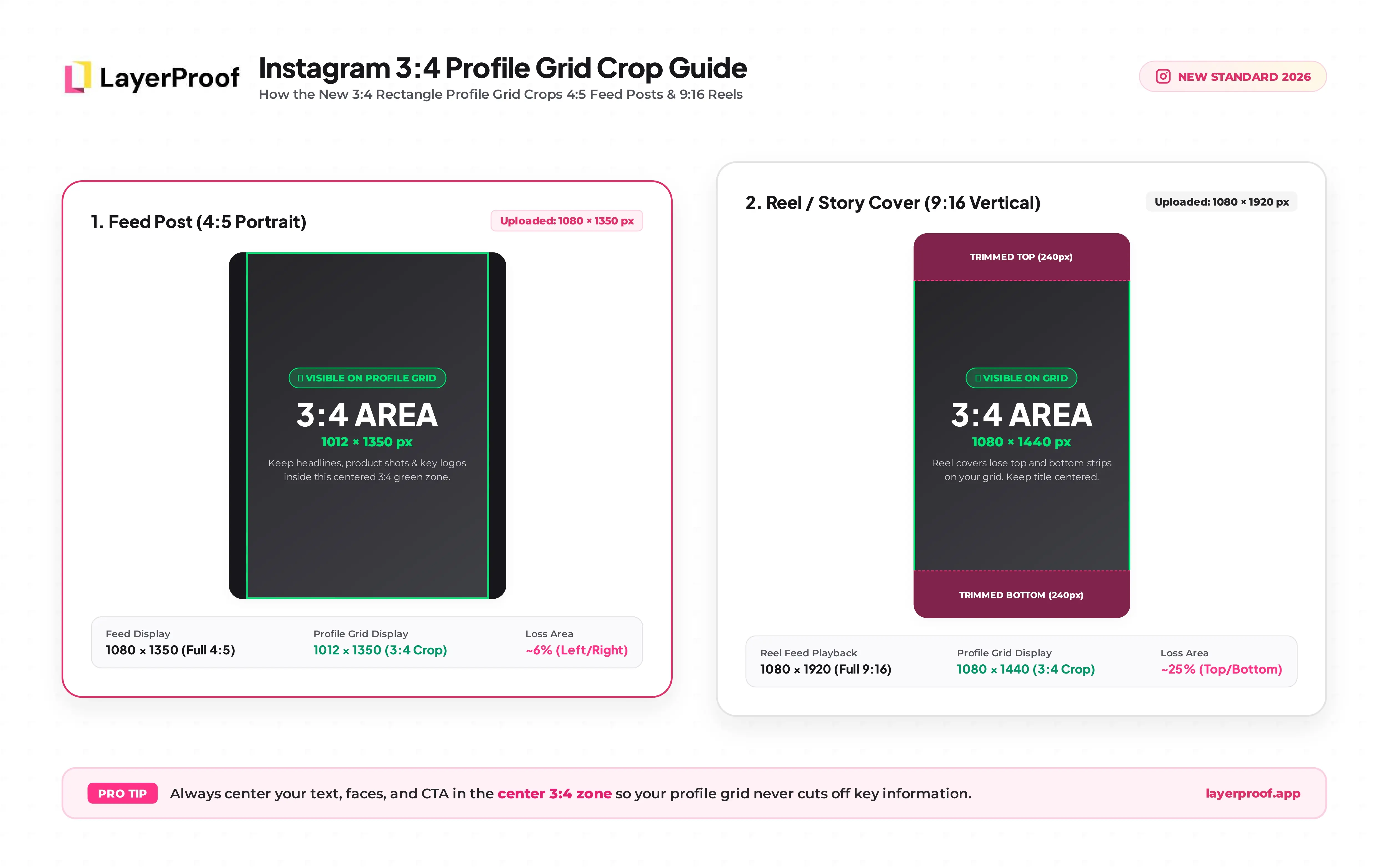
The profile grid shows every post as a 3:4 rectangle, whatever size you uploaded. A 4:5 post loses a thin strip on the left and right, leaving a visible area of about 1012 x 1350 px. A 9:16 Reel cover loses its top and bottom, leaving the center 1080 x 1440 px.
The fix is simple. Keep faces, product shots, and headline text in the center of the frame, and the grid crop will never cut anything important.
Should I post at 4:5 or 3:4 on Instagram?
Post at 4:5 (1080 x 1350 px) if the same design also goes to Facebook, LinkedIn, or X. Post at 3:4 (1080 x 1440 px) for phone photos or if your profile grid is part of your brand look. Both fill more of the feed than a square post.
What are Instagram's file limits?
Upload JPG or PNG files under 8 MB. A carousel holds up to 20 images. Instagram compresses everything on upload, so export at exactly 1080 px wide to avoid a second round of resizing.
What are the Facebook image sizes in 2026?
Facebook feed posts look best at 1080 x 1350 px (4:5), Page and profile covers at 851 x 315 px, and Stories at 1080 x 1920 px. Facebook has more image formats than any other platform, so the table below lists the ones a business Page actually uses.
| Format | Size (px) | Aspect ratio | Notes |
|---|---|---|---|
| Profile photo | 320 x 320 | 1:1 | Displays at 176 x 176 on desktop and 196 x 196 on phones, cropped to a circle |
| Page or profile cover | 851 x 315 | about 2.7:1 | Minimum 400 x 150; displays at 820 x 312 on desktop and 640 x 360 on phones |
| Feed post, portrait | 1080 x 1350 | 4:5 | Takes the most feed space on mobile |
| Feed post, square | 1080 x 1080 | 1:1 | Good for carousels |
| Feed post, landscape | 1200 x 630 | 1.91:1 | Also the link preview size |
| Stories | 1080 x 1920 | 9:16 | Keep the top and bottom 14% (about 270 px) clear |
| Event cover | 1920 x 1005 | 1.91:1 | No profile photo overlaps it |
| Group cover | 1640 x 856 | 1.91:1 | No profile photo overlaps it |
Why does my Facebook cover photo get cut off on mobile?
Facebook shows the same cover at two different shapes. Desktop shows a wide 820 x 312 strip, while phones show a taller 640 x 360 area that trims the left and right sides. Your profile photo also overlaps the bottom-left corner.
Keep your logo, offer, and any text inside the center of the image, roughly the middle 640 px of width. Use PNG for covers with text or a logo, since JPG compression blurs sharp edges.
What size should a Facebook link preview image be?
Use 1200 x 630 px. Facebook pulls this image from the og:image tag on the page you share, not from your post, so the fix lives on your website. Keep the file under 8 MB.
What are the TikTok image sizes in 2026?
TikTok photo posts, video covers, and Stories all use 1080 x 1920 px (9:16). TikTok is built for full-screen vertical viewing, so almost every image format shares that one size. What changes between formats is how much of the screen TikTok's buttons and captions cover.
| Format | Size (px) | Aspect ratio | Notes |
|---|---|---|---|
| Profile photo | 200 x 200 minimum | 1:1 | Cropped to a circle; upload a larger square so it stays sharp |
| Photo mode (carousel) | 1080 x 1920 | 9:16 | Up to 35 images per post; 4:5 and 1:1 display with bars |
| Video cover | 1080 x 1920 | 9:16 | The profile grid shows a centered 3:4 crop |
| Stories | 1080 x 1920 | 9:16 | Disappear after 24 hours |
What is the TikTok safe zone?
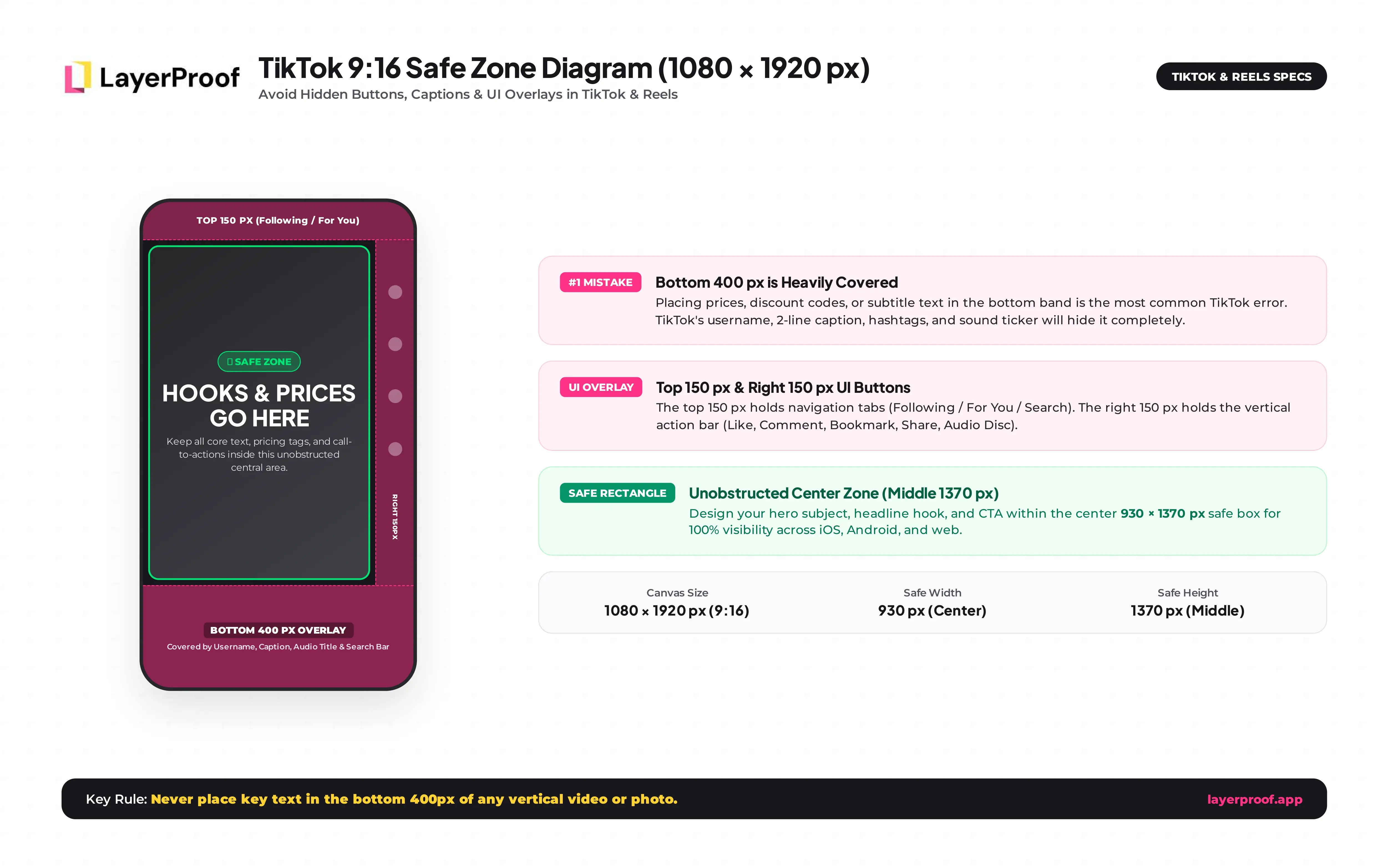
The TikTok safe zone is the center area of the screen that no buttons, captions, or tabs cover. Guides measure it slightly differently, so use these conservative margins on a 1080 x 1920 canvas:
- Top 150 px: The Following and For You tabs sit here.
- Bottom 400 px: Your username, caption, and sound name cover this band.
- Right 150 px: The like, comment, share, and save buttons run down this edge.
Prices, product names, and hooks belong in the middle of the frame. Placing them in the bottom strip is the most common TikTok design mistake.
Can I post a square or 4:5 image on TikTok?
Yes. TikTok accepts 1:1 and 4:5 images in photo mode, but it fills the empty space with bars. A 9:16 version always fills the screen, so resize instead of reusing your Instagram feed post as is.
Posting video instead of photos? Mylar turns a link, a script, or a rough idea into an AI motion graphic video for TikTok and Reels.
What are the LinkedIn image sizes in 2026?
LinkedIn feed images work best at 1080 x 1350 px (4:5), personal banners at 1584 x 396 px, and company Page covers at 4200 x 700 px. LinkedIn accepts post images anywhere between 3:1 and 4:5 and needs a minimum width of 1080 px for sharp results.
| Format | Size (px) | Aspect ratio | Notes |
|---|---|---|---|
| Profile photo | 400 x 400 | 1:1 | Cropped to a circle; up to 8 MB |
| Personal background | 1584 x 396 | 4:1 | Your profile photo covers the lower left |
| Page logo | 400 x 400 | 1:1 | Minimum 268 x 268; shown square, on light and dark backgrounds |
| Page cover | 4200 x 700 | 6:1 | LinkedIn's minimum and recommended size; keep the lower right clear |
| Feed post, portrait | 1080 x 1350 | 4:5 | Most screen space on mobile |
| Feed post, square | 1080 x 1080 | 1:1 | Safe choice for carousels |
| Link preview | 1200 x 627 | 1.91:1 | Pulled from the shared page's og:image |
| Article or newsletter cover | 1920 x 1080 | 16:9 | Shown as the header of long-form posts |
Why do guides list 1128 x 191 px for LinkedIn Page covers?
That number is out of date. LinkedIn's help center now lists 4200 x 700 px as both the minimum and recommended Page cover size. A 1128 x 191 px upload looks blurry on high-resolution screens because LinkedIn has to scale it up.
What are the X (Twitter) image sizes in 2026?
X profile photos are 400 x 400 px, headers are 1500 x 500 px, and in-feed images work best at 1080 x 1350 px (4:5) or 1600 x 900 px (16:9). X stopped auto-cropping most single images, so standard portrait and landscape shapes show in full.
| Format | Size (px) | Aspect ratio | Notes |
|---|---|---|---|
| Profile photo | 400 x 400 | 1:1 | Circle for most accounts; square for Verified Organizations |
| Header | 1500 x 500 | 3:1 | Mobile trims the top and bottom; keep text centered |
| Post image, portrait | 1080 x 1350 | 4:5 | Displays in full in the timeline |
| Post image, landscape | 1600 x 900 | 16:9 | Minimum width 600 px |
| Post image, square | 1080 x 1080 | 1:1 | Works well in multi-image posts |
| Link card | 1200 x 628 | 1.91:1 | Set through Twitter Card tags on your site |
You can add up to four images per post, and they can be different shapes. Keep JPG and PNG files under 5 MB.
What are the Threads image sizes in 2026?
Threads accepts almost any image shape, but 1080 x 1350 px (4:5) takes the most space in the feed. Your Threads profile photo syncs from Instagram, so it follows Instagram's 320 x 320 px size.
- Feed images: Threads does not crop single images, and a post can hold up to 20 photos or videos.
- Square and landscape: 1080 x 1080 px (1:1) and 1080 x 566 px (1.91:1) both display in full.
- Link previews: Threads has not published a link image spec. A standard 1200 x 630 px og:image displays correctly.
Which aspect ratio should I use for social media posts?
Use 4:5 for feed posts and 9:16 for full-screen vertical content. An aspect ratio is the shape of an image written as width to height, and it decides how much of a phone screen your post fills. Pixel size only decides how sharp it looks.
| Aspect ratio | Example size (px) | Best for | Where it gets cropped |
|---|---|---|---|
| 9:16 | 1080 x 1920 | Stories, Reels, TikTok | Grid previews on Instagram and TikTok show a 3:4 center crop |
| 3:4 | 1080 x 1440 | Instagram feed and grid | Not supported as a feed shape on most other platforms |
| 4:5 | 1080 x 1350 | Feed posts on Instagram, Facebook, LinkedIn, X, Threads | Instagram grid trims a thin strip from each side |
| 1:1 | 1080 x 1080 | Carousels, profile photos | Rarely cropped, but smallest in a vertical feed |
| 16:9 | 1600 x 900 | X landscape posts | Small on phones; avoid for Instagram |
| 1.91:1 | 1200 x 630 | Link previews | Set by your website, not your post |
What file format is best for social media images?
Use JPG for photos and PNG for anything with text, a logo, or flat color. JPG keeps photo files small, while PNG keeps letters and edges sharp after the platform compresses them. A few export settings prevent most quality problems:
- Export at the exact width: 1080 px for feed and vertical posts. Uploading larger often triggers harsher compression.
- Use the sRGB color profile: Platforms convert other profiles to sRGB, which can shift your brand colors.
- Ignore DPI: 72 and 300 DPI look identical on screen. Only pixel dimensions matter.
- Stay under file limits: Most platforms cap still images between 5 MB and 8 MB; Facebook and Instagram cap them at 8 MB.
How do I resize one design for every platform without it looking stretched?
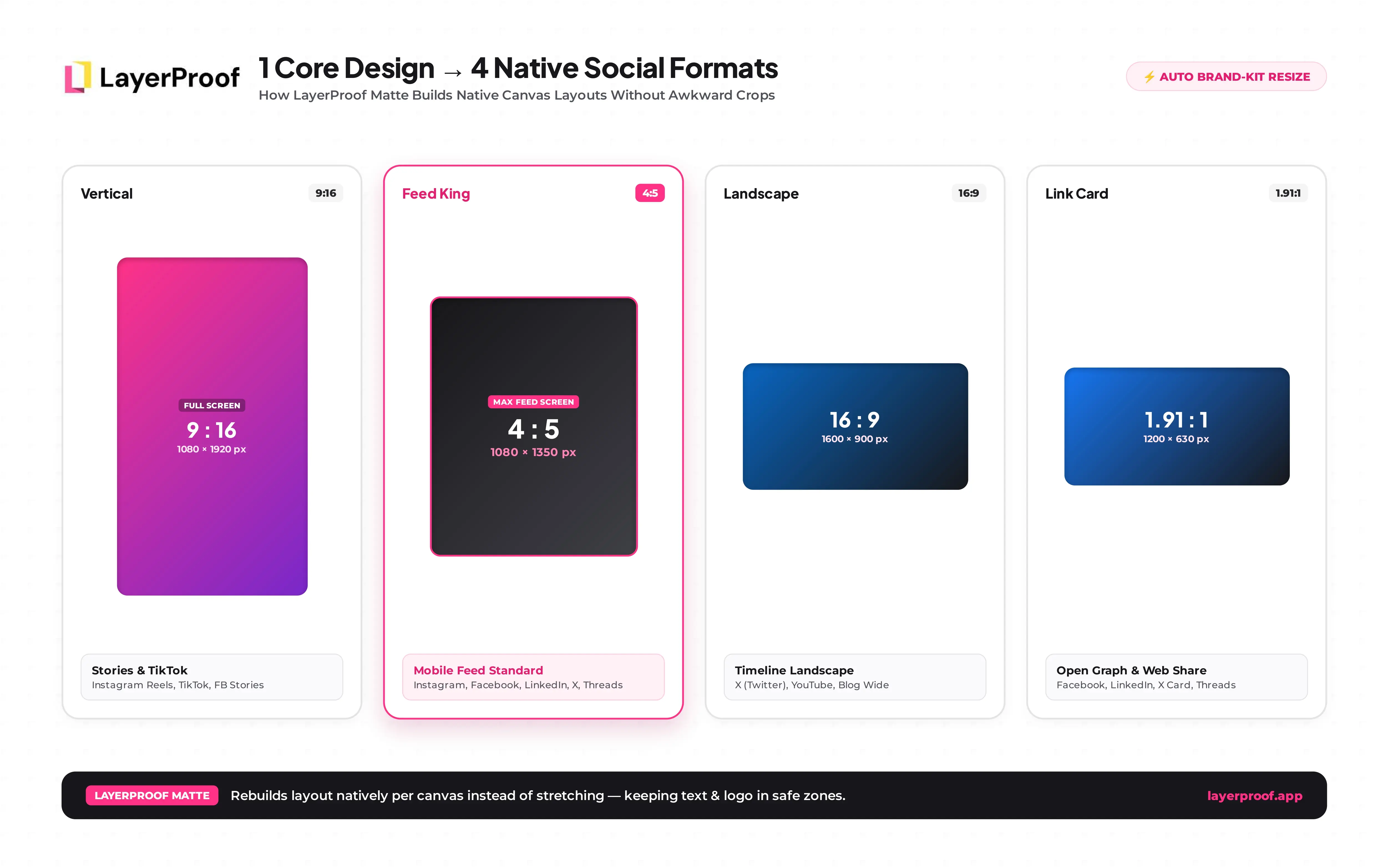
Rebuild the layout for each shape instead of cropping one image. Cropping a 4:5 post into 9:16 either cuts off your headline or leaves empty bands at the top and bottom. A native layout moves the text, logo, and product so each one sits inside that platform's safe zone.
Here is what one post needs if you publish it everywhere covered in this guide:
| Output | Size (px) | Used on |
|---|---|---|
| Feed version | 1080 x 1350 | Instagram, Facebook, LinkedIn, X, Threads |
| Vertical version | 1080 x 1920 | Instagram Stories and Reels, Facebook Stories, TikTok |
| Landscape version | 1600 x 900 | X landscape |
| Link card | 1200 x 630 | Blog or product page shared on any platform |
That is four designs for one announcement. Doing them by hand in a general design tool usually means four artboards, four rounds of nudging text, and four exports.
Matte builds each post in a canvas sized to each platform's exact dimensions, so Facebook, Instagram, and TikTok each get a native layout instead of one stretched image. Your Brand Kit applies your logo, colors, and fonts to every version automatically. Your first post is ready in about 5 minutes, and each post works out to about $0.3.
If your product photo is what doesn't fit, Vellum turns one product shot into new backgrounds, angles, and crops for each format. If you post to Facebook, Instagram, and TikTok every week, get started today with Matte.
Frequently asked questions about social media image sizes
What is the best image size for social media posts in 2026?
1080 x 1350 px (4:5) is the best single size for feed posts in 2026. It displays without cropping on Instagram, Facebook, LinkedIn, X, and Threads, and fills more of a phone screen than a square. Use 1080 x 1920 px for Stories, Reels, and TikTok.
What size is an Instagram post in 2026?
An Instagram post is 1080 px wide and between 566 px and 1440 px tall. The most useful sizes are 1080 x 1350 px (4:5) and 1080 x 1440 px (3:4). The 3:4 size matches the profile grid exactly, so nothing gets trimmed there.
What happens if I upload the wrong image size?
The platform crops, shrinks, or pads your image to fit its layout. Text near the edges can get cut off, small images turn blurry, and wrong shapes can show up with black or blank bars. Uploading at the recommended size keeps you in control of what people see.
What is a safe zone on social media?
A safe zone is the part of an image that platform buttons, captions, and profile photos never cover. On 9:16 formats like Stories and TikTok, keep text out of roughly the top 150 to 250 px and bottom 340 to 400 px. On covers and banners, keep text in the center.
Can I use the same image on every social media platform?
You can, but it will look native on only some of them. A 4:5 feed post works across most feeds, yet it needs a separate 9:16 layout for Stories and TikTok. Matte builds the Facebook, Instagram, and TikTok versions in their own canvases, so you design once.
How often do social media image sizes change?
Major changes happen roughly once or twice a year per platform. Recent examples include Instagram's 3:4 profile grid in January 2025 and LinkedIn raising its Page cover size to 4200 x 700 px. Check the platform's help center before redesigning a cover or template.
What resolution should social media images be?
Resolution on social media means pixel dimensions, not DPI. Export feed and vertical images at 1080 px wide and covers at the full recommended size. A 72 DPI and a 300 DPI file with the same pixels look identical on screen.
References
Plain text, as published at the foot of the article. Official platform documentation only.
- https://www.linkedin.com/help/linkedin/answer/70781 · Image specifications for your LinkedIn Pages and Career Pages · LinkedIn Help, accessed October 1, 2026 · LinkedIn
- https://www.facebook.com/help/125379114252045 · How to make a cover photo for your Facebook Page · Facebook Help Center, accessed October 1, 2026 · Meta
- https://help.x.com/en/managing-your-account/common-issues-when-uploading-profile-photo · Profile and header image guidelines · X Help Center, accessed October 1, 2026 · X Corp.
- https://9to5mac.com/2025/05/29/instagram-changes-standard-photo-aspect-ratio/ · No more cropping: Instagram changes standard photo aspect ratio · May 29, 2025 · 9to5Mac