The TikTok video size is 1080 x 1920 px, a vertical 9:16 frame that fills a phone screen from edge to edge. On that point every guide agrees. Ask about maximum length, file size, or upload limits and the numbers start to split, because TikTok rolls features out account by account and publishes only some of its limits.
This guide separates the two. Specs TikTok states in its own help pages are marked as confirmed. Figures that come from testing and reports are labeled that way, with a safe working target you can use either way.
Key takeaways
-
Shoot and export at 1080 x 1920 px (9:16). Anything else gets black bars or a crop, and TikTok downscales 4K to 1080p anyway.
-
Plan for 10 minutes, not 60. In-app recording tops out at 10 minutes, and the 60-minute upload is not on every account. Scheduling tools also cap at 10 minutes.
-
Keep text in the middle of the frame. The caption, username, and sound name cover roughly the bottom 480 px, and the action buttons cover the right edge.
-
Upload big files from a computer. Phone uploads have lower size caps than the web uploader, so long or high-bitrate videos go up more cleanly on desktop.
-
Ads follow stricter rules. In-feed ads need at least 540 x 960 px, 5 to 60 seconds, and a file under 500 MB.
What are the full TikTok video specs?
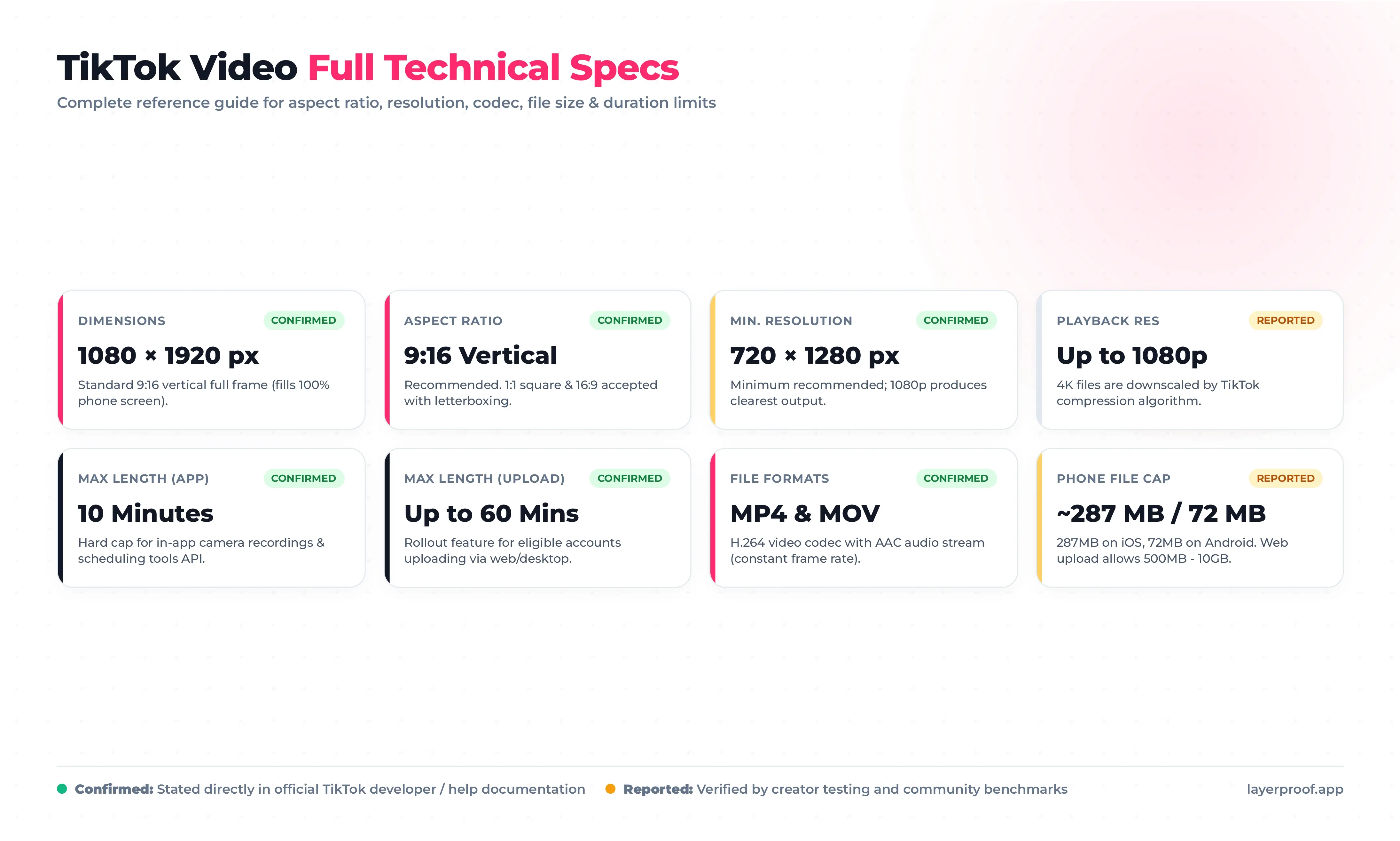
The table covers every technical spec that affects how a TikTok video looks after upload. “Confirmed” means TikTok states it in its own help or developer documentation. “Reported” means the figure comes from creator testing and is widely repeated, but TikTok has not published it.
| Spec | Value | Status |
|---|---|---|
| Dimensions | 1080 x 1920 px | Confirmed |
| Aspect ratio | 9:16 recommended; 1:1 and 16:9 accepted | Confirmed |
| Suggested minimum resolution | 720 x 1280 px | Confirmed (ads documentation) |
| Playback resolution | Up to 1080p; 4K uploads are downscaled | Reported |
| Minimum length | 3 seconds | Reported |
| Maximum length, recorded in app | 10 minutes | Confirmed |
| Maximum length, uploaded | Up to 60 minutes on accounts with access | Confirmed, varies by account |
| File formats | MP4 and MOV | Confirmed |
| Video codec | H.264 with AAC audio | Reported |
| Frame rate | 30 fps standard, up to 60 fps | Reported |
| File size, phone app | About 287 MB on iPhone, 72 MB on Android | Reported |
| File size, web upload | Much higher than phone; figures range from 500 MB to 10 GB | Reported |
Which of these numbers should I actually design for?
Design for the confirmed ones and stay well inside the reported ones. In practice that means a 1080 x 1920 px MP4 at 30 fps, under 10 minutes, and under about 250 MB if you plan to post from a phone. A file that fits those targets uploads on any account and any device.
What happens if my video is not 9:16?
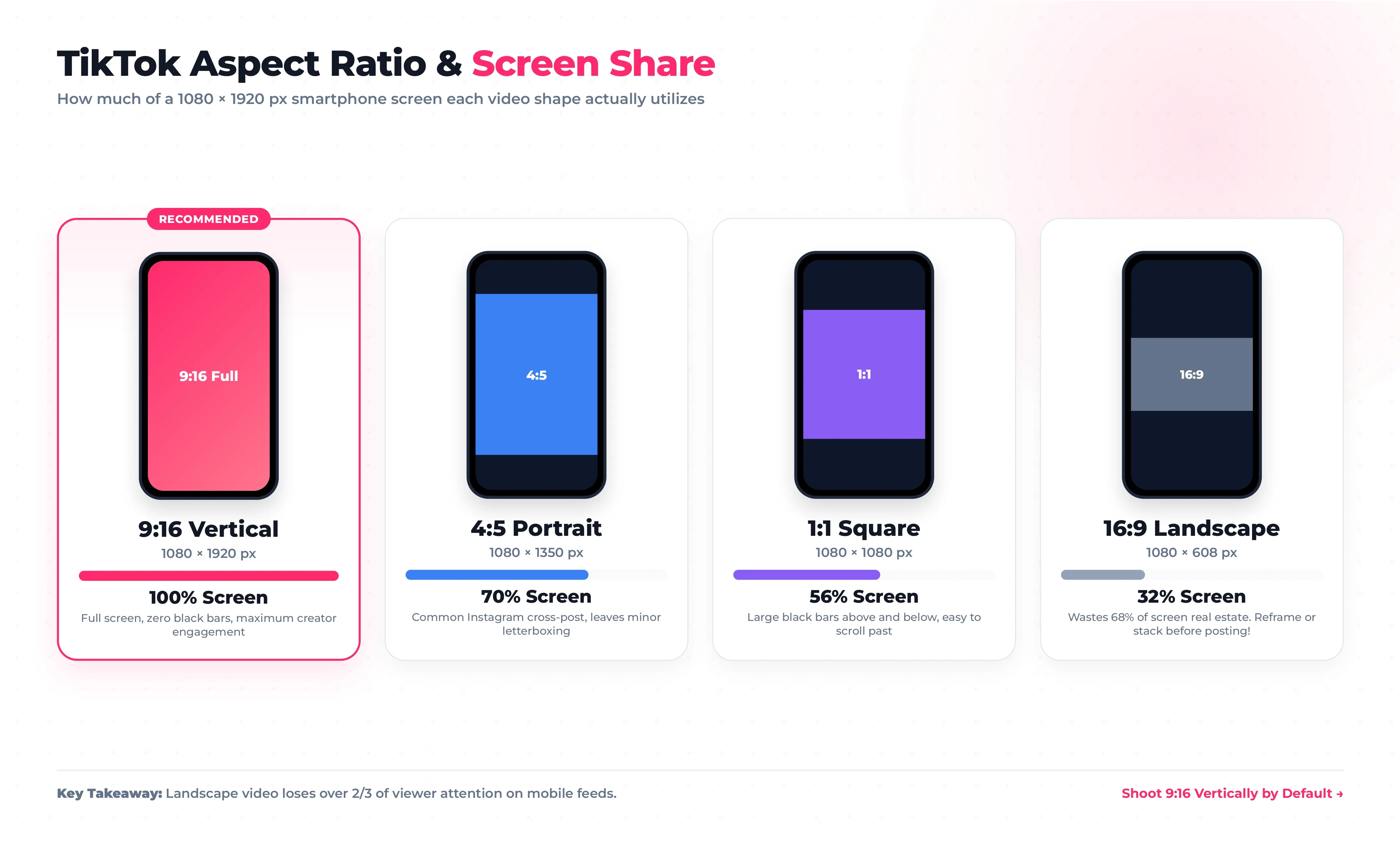
TikTok plays it, but it shrinks to fit the width of the screen and fills the rest with bars. The table shows how much of a 1080 x 1920 px phone screen each shape actually uses:
| Upload shape | Shown at (px) | Share of the screen |
|---|---|---|
| 9:16 vertical | 1080 x 1920 | 100% |
| 4:5 portrait | 1080 x 1350 | 70% |
| 1:1 square | 1080 x 1080 | 56% |
| 16:9 landscape | 1080 x 608 | 32% |
A landscape video uses less than a third of the screen. On a feed where every other video fills the frame, that is easy to scroll past.
How do I turn a landscape video into 9:16?
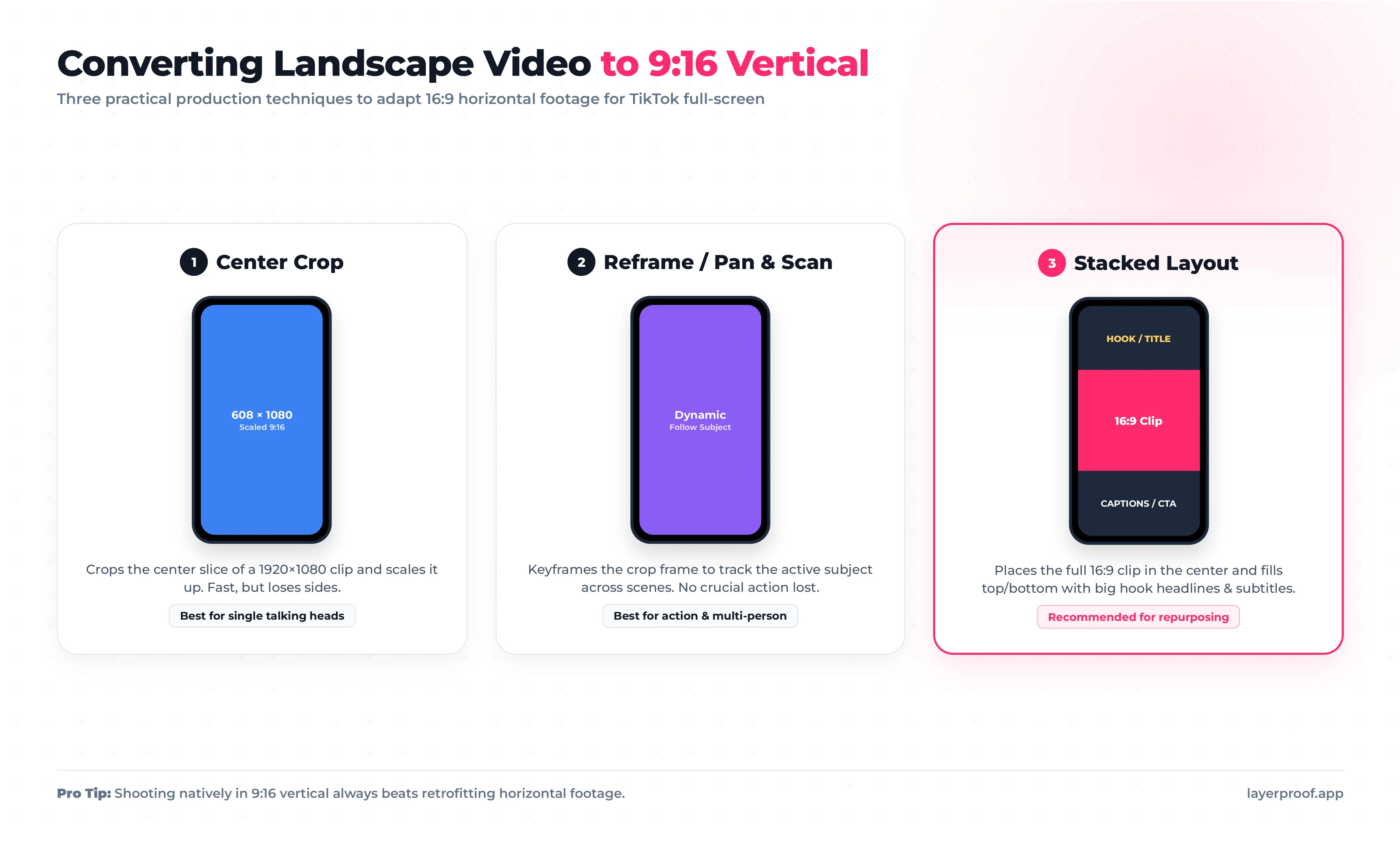
You have three options, and the right one depends on the footage:
-
Crop to the center. Fast, but you keep only a 608 x 1080 px slice of a 1920 x 1080 px clip, which then has to be scaled up. Fine for a single person talking; poor for anything wide.
-
Reframe shot by shot. Move the crop to follow the subject in each scene. Slower, but nothing important leaves the frame.
-
Stack the layout. Place the landscape clip in the middle and use the space above and below for a headline and captions. This keeps the full shot and puts the empty space to work.
For new content, shooting vertically from the start beats all three.
Where should text go in a TikTok video?
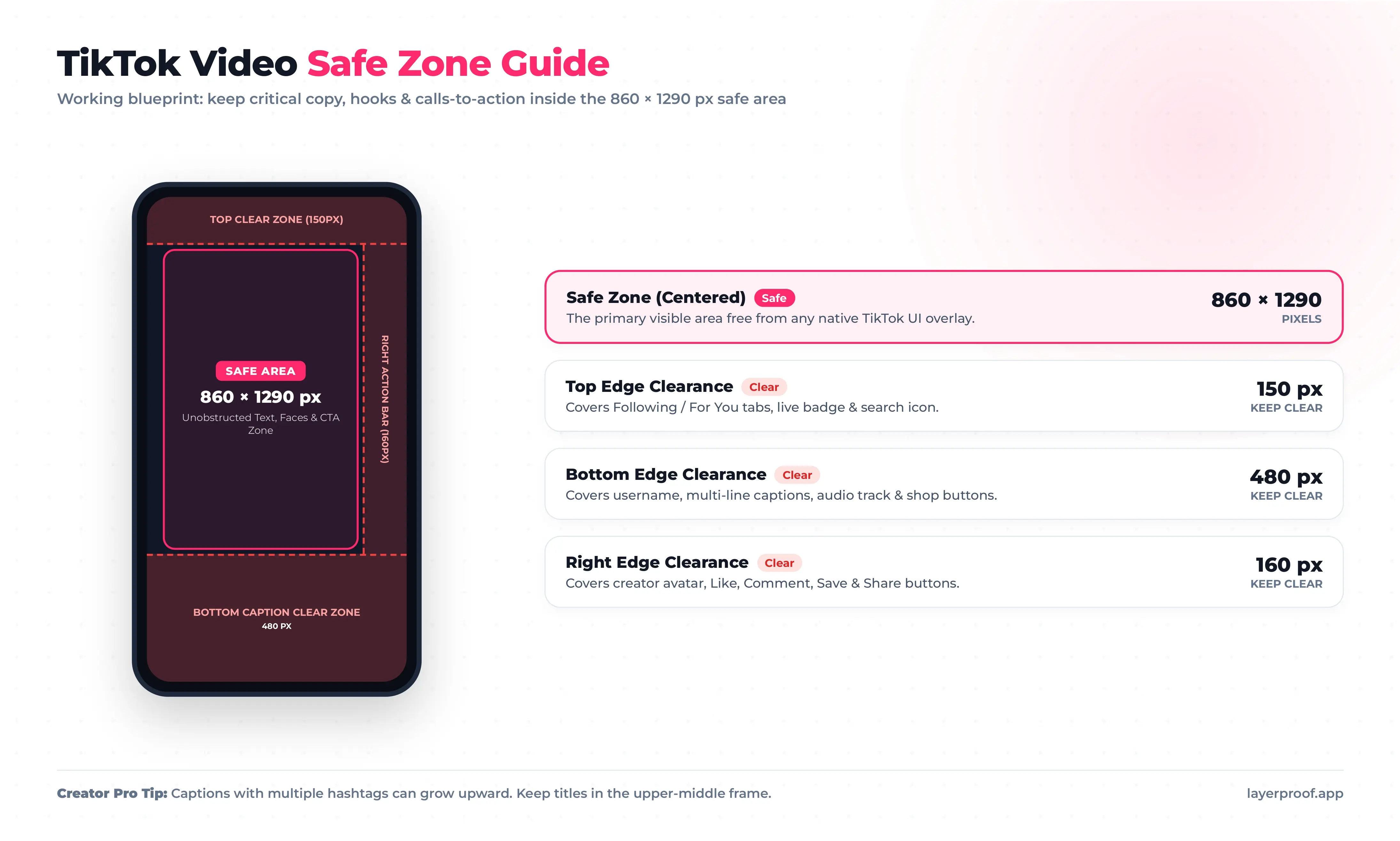
Put on-screen text in the middle of the frame, slightly above center. TikTok draws its interface on top of your video, and the overlays sit on all four sides. TikTok does not publish exact pixel margins, and they shift slightly between phones, so these are conservative working values for a 1080 x 1920 px frame:
| Edge | Keep clear (px) | What covers it |
|---|---|---|
| Top | 150 | Following and For You tabs, search, live badge |
| Bottom | 480 | Username, caption, sound name, and ad buttons |
| Right | 160 | Profile picture, like, comment, save, and share buttons |
| Left | 60 | Nothing fixed, but captions start close to this edge |
That leaves a safe area of about 860 x 1290 px. Anything inside it stays visible on every phone, with or without a long caption.
Why does my caption cover the text in my video?
Long captions grow upward. A two-line caption fits inside the bottom 480 px, but a caption with hashtags and a “See more” link can climb higher. If your video carries a key line of text, keep it in the upper half of the safe area, and keep the caption short.
How long can a TikTok video be?
A TikTok video can be up to 10 minutes when you record it in the app. Uploaded videos can run up to 60 minutes, but only on accounts where TikTok has turned that on. TikTok first tested hour-long uploads in 2024 and has rolled them out gradually since, so the limit you see depends on your account and your region.
| How you post | Maximum length |
|---|---|
| Recorded with the TikTok camera | 10 minutes |
| Uploaded from your phone or computer | Up to 60 minutes, if your account has it; otherwise 10 minutes |
| Posted through a scheduling tool | 10 minutes |
| TikTok Story | 15 seconds |
Scheduling tools post through TikTok’s Content Posting API, and that API caps videos at 10 minutes. If you schedule your posts, treat 10 minutes as the hard limit.
Is there a file size limit for TikTok uploads?
Yes, but TikTok does not publish it, and it depends on where you upload from. Creators commonly report about 287 MB from an iPhone and 72 MB from an Android phone. The web uploader at tiktok.com accepts much larger files; reported caps range from 500 MB to 10 GB depending on the account.
The practical rule: if a file is over about 250 MB, upload it from a computer. If the upload still fails, export again at a lower bitrate rather than a lower resolution.
What export settings keep a TikTok video sharp?
TikTok re-encodes every upload, so the goal is to hand it a clean file at exactly the size it plays at. These settings work in any editor:
| Setting | Use | Why |
|---|---|---|
| Resolution | 1080 x 1920 px | Higher resolutions are downscaled, which adds a second round of processing |
| Container and codec | MP4, H.264 | The most widely accepted combination for TikTok uploads |
| Frame rate | Same as your footage: 24, 25, 30, or 60 fps | Converting frame rates adds stutter; 30 fps suits most content |
| Frame rate mode | Constant | Variable frame rate from phone recordings can drift out of sync |
| Bitrate | About 8 to 12 Mbps at 30 fps | Enough detail to survive compression without an oversized file |
| Audio | AAC, 48 kHz, 128 to 320 kbps | Clean audio that will not be resampled badly |
One more step happens on the phone. When you post, open the extra settings and turn on the option to upload in high quality. If it is off, TikTok may compress the file harder to save data.
Why does my video look worse on TikTok than in my editor?
Usually one of three reasons: the file was exported above 1080p and scaled down twice, the bitrate was too low for fast motion, or the high-quality upload option was off. Fix the first two in your export settings and the third in the post settings.
What size is a TikTok cover, profile photo, and photo post?
The images around your videos follow their own sizes:
| Image | Size (px) | Notes |
|---|---|---|
| Video cover | 1080 x 1920 | Pick a frame or upload an image; your profile grid shows a centered 3:4 crop |
| Profile photo | 200 x 200 minimum; upload 400 x 400 or larger | Shown as a small circle next to every video |
| Photo mode slide | 1080 x 1920 | Up to 35 images per post; square and 4:5 images show with bars |
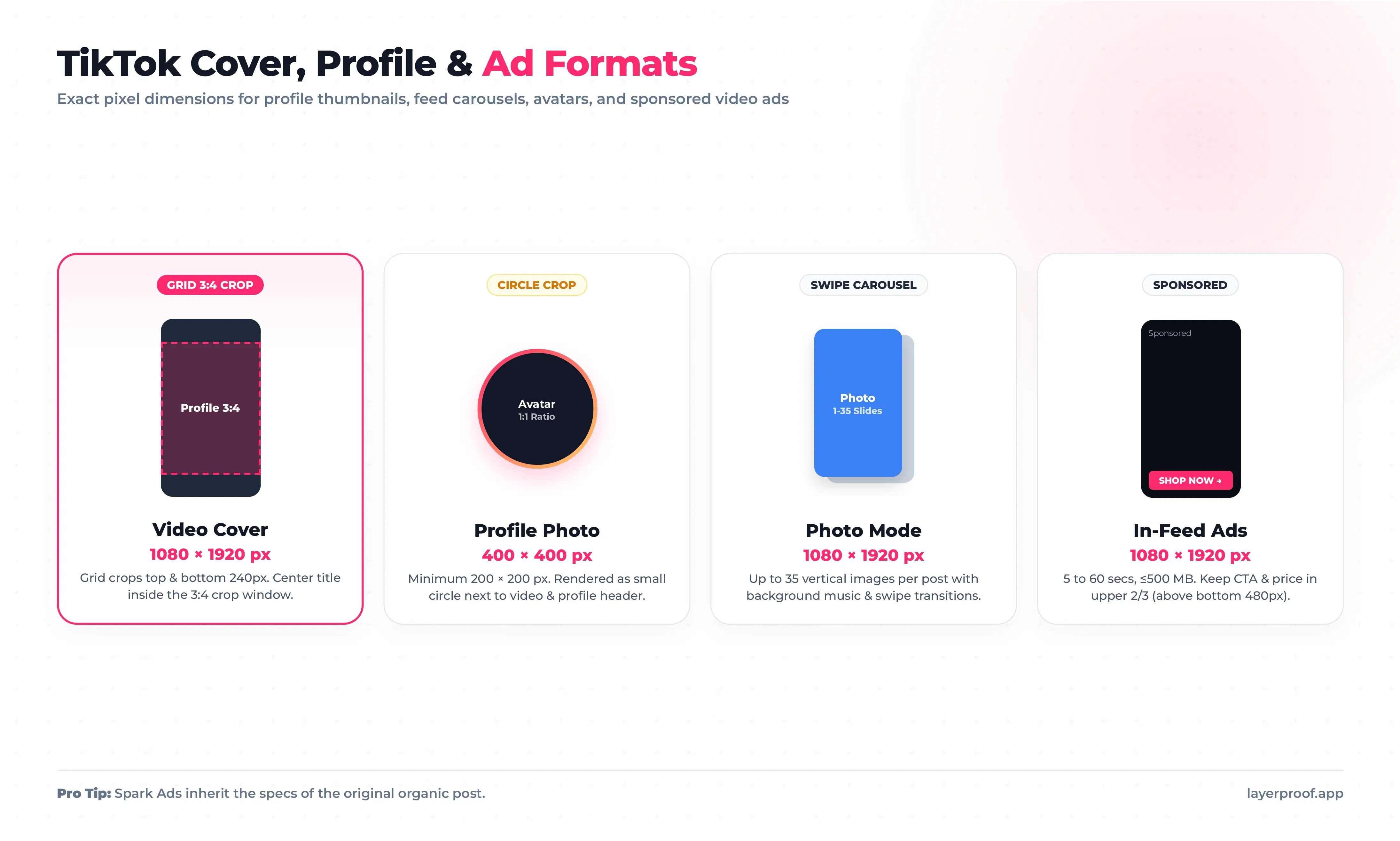
How do I make a TikTok cover that works on my profile?
Your profile grid crops each cover to a 3:4 rectangle, losing about 240 px from the top and bottom of a 1080 x 1920 px image. Put the title in large type in the middle of the cover, and keep faces away from the top and bottom edges.
Are photo posts worth making?
Photo mode posts are a quick way to share step-by-step tips, product lineups, or before-and-after shots without filming. Build every slide at 1080 x 1920 px and keep each one to a single idea. Matte lays out posts on a canvas set to TikTok’s exact size, along with Instagram and Facebook versions of the same idea, and your first post is ready in about 5 minutes.
What are the TikTok ad video specs?
TikTok in-feed ads use the same 1080 x 1920 px frame as organic videos, but with firm minimums and a fixed file cap. An ad that misses one of these is rejected before it runs.
| Spec | In-feed ads | Spark Ads |
|---|---|---|
| Aspect ratio | 9:16 recommended; 1:1 and 16:9 accepted | Same as the original post |
| Minimum resolution | 540 x 960 px (9:16), 640 x 640 px (1:1), 960 x 540 px (16:9) | Same as the original post |
| Recommended resolution | 720 x 1280 px or higher; 1080 x 1920 px is best | Same as the original post |
| Length | 5 to 60 seconds | Same as the original post |
| File size | 500 MB or less | Same as the original post |
| File types | MP4, MOV, MPEG, 3GP, AVI | Same as the original post |
| Bitrate | At least 516 kbps | Same as the original post |
Spark Ads boost a video that is already posted on an account, so they inherit its specs instead of having their own. That makes the organic export settings above doubly important if you plan to promote a post later.
Do TikTok ads need a different safe zone?
Yes, slightly. Ads add a call-to-action button and a “Sponsored” label above the caption, so the bottom overlay is taller than on an organic video. Keep prices and offers in the upper two-thirds of the frame, well clear of the bottom 480 px.
How can I make TikTok videos without filming?
Many small businesses skip TikTok because they have no footage, not because they lack ideas. A product page, a blog post, or a short script already holds enough material for a 20 to 40 second video. The hard part is turning it into motion at the right size.
Mylar handles that step. You give it a link, a script, or a rough idea, and it produces an AI motion graphic video in the 9:16 vertical format TikTok plays full screen. Because the video is built vertically from the start, text and products are placed inside the safe area rather than cropped to fit afterward.
A simple weekly routine for a business account:
-
Pick one source. A new product, a customer question, or a recent blog post.
-
Turn it into a video. Generate a short vertical video from the link or a few lines of script.
-
Check it against this guide. 1080 x 1920 px, text clear of the bottom 480 px, under 10 minutes.
-
Post from the device that suits the file. Phone for short clips, computer for anything large.
Mylar and Matte are both part of LayerProof, so a video and a set of still posts can start from the same idea. Get started today and post your first vertical video this week.
Frequently asked questions about TikTok video size
What is the best video size for TikTok?
1080 x 1920 px at a 9:16 aspect ratio. It fills the screen with no bars, and it matches the resolution TikTok plays videos at, so nothing gets scaled.
Can I upload 4K videos to TikTok?
Yes, TikTok accepts 4K files, but it plays them at 1080p. Downscaling before upload gives you control over the result; letting TikTok do it adds a second round of compression.
Can a TikTok video be horizontal?
Yes. TikTok accepts 16:9 videos and shows them with bars above and below. A landscape video fills only about a third of the screen, so reframe or stack it as 9:16 when you can.
Why can’t I upload a video longer than 10 minutes?
Uploads up to 60 minutes are not available on every account yet. If your upload screen stops at 10 minutes, that is your current limit. Videos posted through scheduling tools are also capped at 10 minutes.
Does TikTok compress videos?
Yes, every upload is re-encoded. You cannot turn that off, but you can limit the damage: export at 1080 x 1920 px with a healthy bitrate, and turn on the high-quality upload option when posting.
What size is a TikTok Story?
A TikTok Story uses the same 1080 x 1920 px frame as a regular video and can be up to 15 seconds long. It disappears from your profile after 24 hours.
References
-
https://ads.tiktok.com/help/article/video-ads-specifications · List of Video Ad Specifications · TikTok Ads Help Center, accessed October 4, 2026 · TikTok
-
https://techcrunch.com/2024/05/16/tiktok-upload-60-minute-videos/ · TikTok tests 60-minute video uploads · May 16, 2024 · TechCrunch