How-to

Connect your social media accounts

Link LinkedIn, Facebook, Instagram, TikTok, Threads and X to publish or schedule posts directly from LayerProof.

To publish or schedule posts inside LayerProof, you need to connect your social media accounts first. If you only generate images and download them to post manually, you can skip this step.

There are three places to connect, and all three lead to the same list of accounts. Use whichever is most convenient.

1

Option 1. From the create-post page

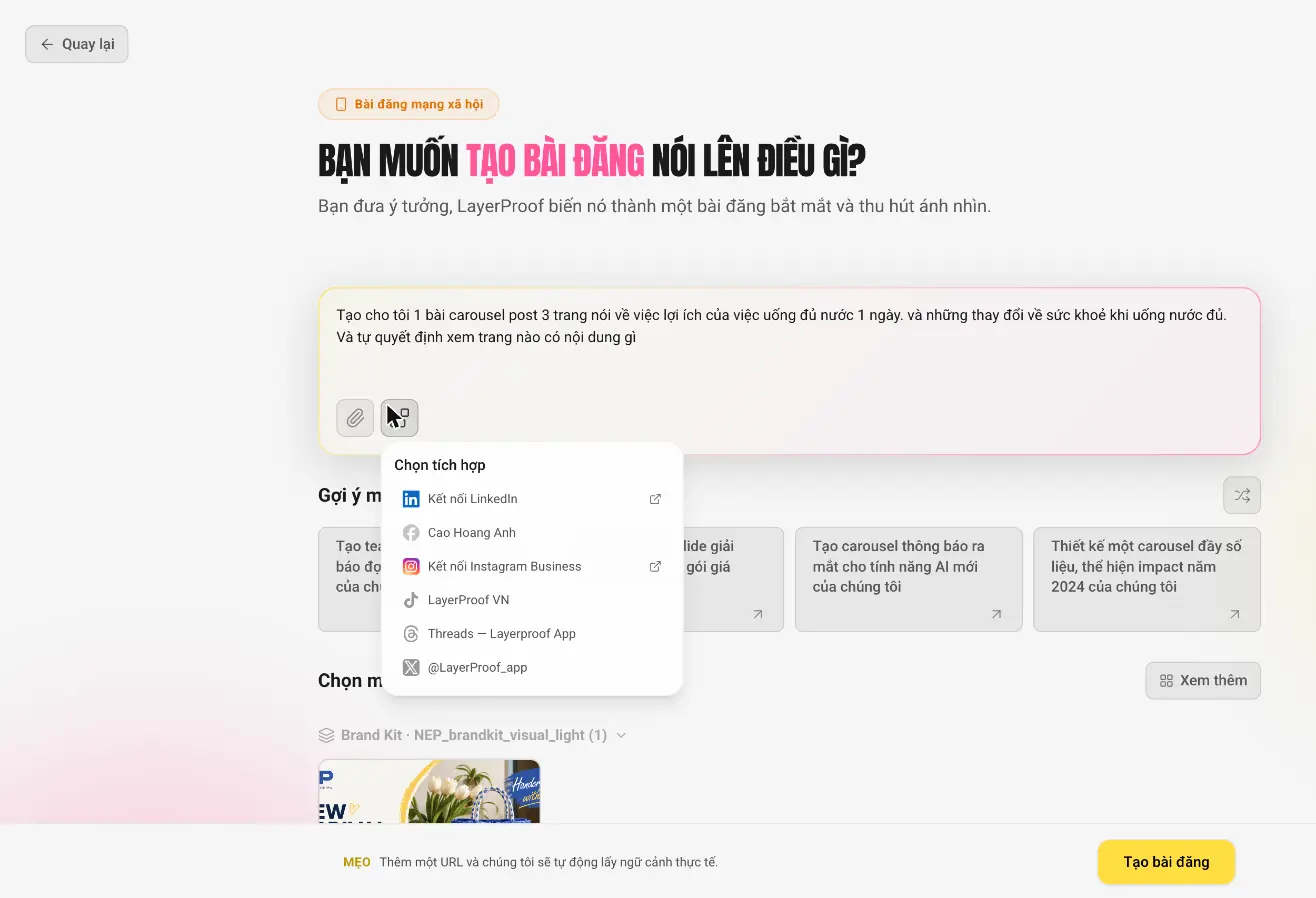
In the idea box, click the Select integration icon next to the attach-file button. The list shows LinkedIn, Facebook, Instagram, TikTok, Threads and X. Connected platforms show the account name; unconnected ones show "Connect...". Click that row to link it, and you'll be asked to sign in to the platform.

Select integration on the create-post page
2

Option 2. From Settings

Go to Settings, then Apps and integrations. This is where all connected accounts are managed.

Apps and integrations in Settings
  1. Filter: All, Active and Inactive.
  2. Search box.
  3. + Add app & integration: click to connect a new account.

Each connected account is a card with three buttons: Edit, Manage integration and Disconnect.

3

Option 3. From Content Calendar

In Content Calendar, click Accounts. The Connected accounts page lists LinkedIn, X, Threads, TikTok and Instagram, each with a Connect button.

4

Notes per platform

  • Instagram: requires a Professional account (Business or Creator). Change the account type in the Instagram app under Settings.
  • Facebook: requires a Page (not a personal profile) and you must be an admin of that Page.
  • TikTok: you can post images or videos.
  • X: posts tweets with images.
  • Threads: posts text and images.

⚠️ Disconnect removes the account link from LayerProof. The Connected accounts page states that removing an account disconnects it everywhere in the app.

Related guides

Ready to put your ideas into action?

Turn what you've learned into social posts and videos with LayerProof.

Try LayerProof